Lenovo Used IFA 2026 to Push Qira Into a Much Bigger Role
Lenovo’s IFA 2026 update for Lenovo & Motorola Qira is about expanding where the same personal AI can show up. At Lenovo Innovation World in Berlin on September 3, Lenovo announced that Qira is reaching more eligible PCs, more Motorola devices, a wearable, and a wider set of connected app experiences. The direction is clear: Lenovo wants one intelligence to follow the user across the devices and services that already make up a normal day. That turns Qira from a feature attached to one machine into a broader personal layer that can stay useful while the user moves between screens, applications, and moments.
The Core Idea Is One Personal AI Across Multiple Devices
Lenovo describes Qira as personal ambient intelligence built to work across compatible Lenovo and Motorola devices. The same intelligence appears as Lenovo Qira on Lenovo products and Motorola Qira on Motorola products, with a shared experience designed to carry context across PCs, smartphones, tablets, and wearables. That continuity is the foundation of the whole system. A conversation, saved document, meeting context, or personal knowledge item can remain useful as the user moves between supported devices. The value is not only having AI on several products. It is having one personal AI identity that is designed to remain consistent across them.
IFA Expands Qira to More 16GB Lenovo PCs
One of the most practical IFA announcements is broader PC eligibility. Lenovo says Qira support is expanding to eligible Lenovo PCs with 16GB of memory, extending access beyond the higher-memory configurations that defined earlier availability. That matters because it brings the personal-AI layer into a larger part of Lenovo’s PC portfolio. More compatible systems can now participate in the same cross-device experience, giving Qira a broader hardware base. For users, the important idea is continuity: the same personal knowledge and context can become available on more of the devices they already use.
Motorola Qira Is Expanding With Android 17
Lenovo also says Motorola Qira will expand to eligible Motorola devices as they receive Android 17. The company names select edge, signature, and razr devices in the rollout. This connects the phone more tightly to the same personal-AI identity used on compatible PCs and other Lenovo devices. A phone is a natural place for context because it is with the user throughout the day, capturing conversations, messages, schedules, photos, and quick requests. Bringing Qira deeper into Motorola’s Android lineup gives Lenovo another important surface for keeping the personal experience continuous.
Moto Watch Ultra Becomes Qira’s First Wearable
Lenovo identifies the new moto watch ultra as the first wearable to support Motorola Qira. That is a meaningful expansion because a wearable gives personal AI a different kind of presence. It is closer to the user throughout the day and can become another surface for timely information, quick interactions, and connected experiences. In Lenovo’s broader vision, Qira is not tied to one screen size or one category. The intelligence is the common layer. Moving from PC to phone to wearable makes that idea easier to understand: the device changes, but the personal AI remains part of the same system.

The Bigger IFA Upgrade Is Moving From Devices Into Apps
Lenovo’s new announcement becomes especially interesting when Qira moves beyond hardware and into everyday applications and services. Lenovo says supported Qira experiences can connect with Gmail, Google Calendar, Google Contacts, Slack, Outlook Mail, and Outlook Calendar through its collaboration with Workato. That gives Qira a path from understanding the user’s request to working with information and actions inside the services that already organize email, meetings, contacts, and collaboration. The personal AI can therefore become useful not only because it knows the user’s context, but because it can connect that context to the tools that help complete the next step.
Workato Is the Connectivity Layer Behind the New App Experiences
Lenovo’s separate Workato announcement explains the architecture more clearly. Workato is serving as the connectivity layer powering the underlying Model Context Protocol server infrastructure used for these connected Qira experiences. That detail shows how Lenovo is turning the personal-AI idea into an integration system. Qira can remain the user-facing intelligence while a dedicated connectivity layer helps it reach supported applications and workflows. This separation gives the system a clean structure: personal context and natural-language interaction at the Qira layer, with approved app connectivity underneath.
MCP Gives Qira a Standard Way to Reach More Tools
Model Context Protocol gives AI systems a structured way to connect with tools and data. In Lenovo’s implementation, the Workato-powered MCP layer helps Qira connect natural-language intent with supported services. This creates a useful division of roles. Qira handles the personal context, conversation, and understanding of what the user wants to accomplish. The integration layer exposes approved application capabilities that can help carry out the request. That architecture also gives Lenovo room to expand the ecosystem over time, because new tools can be connected through the same underlying pattern rather than requiring a completely separate personal-AI experience.
The Integration List Extends Beyond Email and Calendars
Lenovo’s Workato release names Microsoft 365, Google Workspace, Trello, Asana, and Discord among the initial integrations described for the collaboration. The Qira expansion release also calls out Gmail, Google Calendar, Google Contacts, Slack, Outlook Mail, and Outlook Calendar. Together, those examples show the range Lenovo is targeting: communication, planning, project management, collaboration, contacts, and personal organization. The point is not the number of logos. The important change is that one personal AI can begin to understand a goal and then connect with different supported services that each handle part of the user’s day.
A Natural-Language Request Can Become an App Action
Lenovo gives concrete examples of how this connected model is meant to work. A user can ask Qira to create a Trello task for a website redesign project, or ask it to share meeting notes with a team in Discord. The value is the direct path between the request and the supported action. The user stays in the Qira experience while the integration layer connects that intent to the service that can complete the next step. This is where personal AI starts to feel more agentic: understanding a request is only the beginning, while completing a useful action across a connected service becomes part of the experience.
Catch Me Up Becomes More Useful When Apps Are Connected
Lenovo specifically highlights Catch Me Up as part of the new connected experience. If an important update arrives through email, a group conversation, or a calendar change, Qira can bring relevant information together and help the user continue from the same interface. That fits the larger ambient-intelligence idea: useful context can follow the user rather than remaining limited to the application where it first appeared. A personal AI becomes more valuable when it can connect information from the places the user already works and communicate what matters in a way that fits the current moment.
The Official Demo Shows Presence, Action and Perception
Lenovo’s official Qira demo describes the system around three ideas: Presence, Action, and Perception. Presence means the same intelligence can remain available across devices. Action is about orchestrating supported tasks across apps and devices. Perception is the ability to build useful knowledge around the user and the context they choose to share. The IFA expansion strengthens all three ideas by adding more device surfaces and a broader application layer. The demo also shows features such as context-aware suggestions, live transcription, a personal knowledge base, cross-device control, local AI, Live Mode, and Catch Me Up.
Qira Can Build a Personal Knowledge Base
Lenovo’s product page emphasizes a personal knowledge base where users can add documents and saved memories that Qira can use to support later interactions. This gives the system continuity that goes beyond a single chat session. A file saved earlier, a remembered preference, or information collected on another supported device can become part of the context available when the user asks for help later. Personal AI becomes more useful when it can build on previous information with the user’s control, because the system can support a continuing workflow rather than treating every request as an isolated moment.
Local AI Keeps Part of the Experience Close to the Device
Qira is also designed to use local AI capabilities on compatible devices. Lenovo’s official materials describe experiences that can work directly on the PC, including offline interactions and local creative features. That local layer complements the connected app ecosystem. Some work can remain close to the device, while connected services can contribute when the task benefits from information or actions available elsewhere. This hybrid model fits Lenovo’s broader AI direction: local hardware, personal context, and connected services can work together as parts of one experience rather than separate products.
User Permission and Control Stay Central to the Design
Lenovo repeatedly frames Qira around user permission, choice, and control. Its IFA announcement says the connected experiences are designed to maintain user permission and control as Qira works across supported services. The Qira product page also describes personal data as being stored on the device and cloud connections being used when needed. That makes control part of the product architecture. For a personal AI that is designed to remember context and connect across multiple services, keeping the user at the center is essential to the experience Lenovo is building.
Lenovo Is Building Toward a Qira Marketplace
The Workato collaboration is described as the first phase of a multi-stage agreement. Lenovo says the work begins with Qira for consumers and is intended to extend toward a broader Lenovo Qira marketplace. That points to a platform strategy rather than a fixed set of integrations. If the ecosystem keeps growing, Qira can become a common personal-AI layer connected to a wider range of services while preserving the same device-to-device identity. The marketplace idea also gives developers and service providers a clearer place in Lenovo’s long-term vision for connected personal AI.
IFA 2026 Makes Qira Feel More Like an Ecosystem Than an App
Qira started the year as Lenovo’s cross-device personal ambient intelligence, and the IFA update makes that concept much more concrete. More PC configurations can participate. More Motorola devices are joining. A wearable becomes part of the system. Workato-powered app connections give the intelligence a way to reach the tools people already use. The result looks less like one application and more like an ecosystem layer that spans hardware, software, and services. That is the bigger story behind the IFA announcement: Lenovo is turning Qira into connective tissue across its personal-computing world.
The Upgrade Feeling
The most compelling part of Lenovo Qira is not a single AI trick. It is the idea that the same personal intelligence can move with the user, carry context across devices, and connect that context to supported actions inside everyday applications. IFA 2026 expands that vision in exactly the places that matter: more devices, more surfaces, and more services. If Lenovo keeps building on this architecture, the upgrade may feel less like opening another assistant and more like having one intelligence already present across the digital environment you use every day.
AMD Put Personal AI at the Center of IFA 2026
AMD used the opening keynote at IFA Berlin 2026 to describe a future in which AI becomes a much more personal part of everyday computing. Jack Huynh, senior vice president and general manager of AMD’s Computing and Graphics Group, presented the idea as a shift in the relationship between people and their devices. Instead of treating AI as a separate destination, AMD’s vision places intelligence directly into the computing experience, close to the user and ready to support the work, ideas, and creative moments already happening on the device.
The PC Is Moving From Tool to Partner
The strongest idea in AMD’s keynote is simple: the PC can become something that works alongside the person using it. IFA described this as computing evolving from a tool we use into an extension of human potential. That changes the role of the machine. A traditional computer waits for a command, opens an application, and carries out a task. AMD’s Personal AI vision adds a new layer where the system can understand what the user is trying to achieve and help move that intention toward a useful result.
Context Becomes Part of the Interface
Personal AI becomes more interesting when the system understands context. IFA’s official keynote description says the next generation of agentic PCs can understand what the user is doing, what they want to achieve, and what matters in that moment. That creates a more natural way to interact with technology because the system is no longer limited to one isolated command at a time. The computer can begin to connect the current task, the user’s goal, and the tools available on the device into a more continuous experience.
Agentic PCs Are Designed to Work Proactively
AMD’s vision also moves beyond AI that only responds when someone asks a question. The keynote focused on more proactive computing, where an intelligent system can work alongside the user and help advance a task. That is the basic promise behind the agentic PC: a machine that can participate in a workflow instead of acting only as a passive endpoint. For creators, developers, and everyday users, this points toward computers that can help organize steps, coordinate tools, and keep progress moving with less friction.
On-Device Intelligence Makes AI Feel More Personal
The IFA program puts on-device intelligence at the center of the Personal AI idea. When more intelligence lives on the device, the experience can stay closer to the person using it and respond directly to the local context of the task. IFA specifically highlighted user control and privacy as benefits of this model. For TUF, the bigger story is the change in interaction: local intelligence gives the PC a chance to become a persistent part of the user’s workflow rather than a separate service that always feels one step removed from the machine itself.
Local Compute Gives the PC a Bigger Role
AMD has been steadily expanding the amount of AI work that can happen on end-user devices, and the IFA keynote connects that hardware direction to a broader experience. Local compute is not only about raw performance. It is what gives Personal AI room to become responsive, available, and closely connected to the applications already running on the system. As CPUs, GPUs, NPUs, memory, and software continue to improve together, the PC becomes a much more capable home for AI-assisted work, creation, and experimentation.
AI-Powered Devices Become Part of the Workflow
AMD’s event page describes the keynote as a look at what becomes possible through AMD AI-powered devices. That phrase matters because it places AI inside the device experience rather than around it. A personal system can become the place where ideas begin, where local models assist with work, where creative tools gain new intelligence, and where agents can coordinate steps across applications. The result is a computing model in which AI is not a single feature. It becomes part of the way the whole device supports the user.
Creativity Is a Core Part of AMD’s Vision
AMD and IFA both framed Personal AI around imagination and creativity, not only productivity. The keynote description points to artists, creators, and innovators as people who can gain new ways to turn ideas into something real. That is a strong direction for the next generation of personal computing. A context-aware system can help move from an early idea to research, drafting, visual exploration, code, media, or other creative outputs while keeping the person in control of the direction.
Personal AI Can Help Turn Intention Into Action
One of the clearest phrases in IFA’s description is the idea of turning imagination into action. That captures what makes agentic computing different from a normal assistant. The system does not only provide an answer; it can help move toward an outcome. A user might begin with a goal, and the PC can help translate that goal into a sequence of useful steps. As more applications expose AI-ready workflows, that connection between intention and execution could become one of the defining experiences of a Personal AI computer.
The Workplace Becomes More Collaborative
IFA’s post-keynote coverage also highlighted the workplace. The event described AI as a way to reduce repetitive work and make collaboration across different parts of a business easier. In AMD’s Personal AI model, the computer becomes an active participant in that environment. It can help prepare information, support creative work, coordinate tasks, and keep useful context close to the employee. That makes the PC more than a collection of applications. It becomes a workspace where intelligence can connect those applications around the person’s actual objective.
Open Infrastructure Expands the Possibilities
Another important part of AMD’s direction is openness. IFA’s official profile for Jack Huynh describes his Personal AI vision as a combination of powerful local compute, open software ecosystems, and intelligent cloud services. Open ecosystems give developers more ways to build, experiment, and connect new experiences across hardware and software. For users, that can translate into a wider range of tools and workflows. For developers, it creates more room to build Personal AI experiences that fit different devices, applications, and ways of working.
Consistent Software Helps Ideas Move Across Systems
IFA’s keynote recap emphasized open infrastructures and consistent software as foundations for developing and deploying AI applications across an organization. That gives AMD’s vision another useful dimension. Personal AI can begin on a local device, but the software around it can help the same ideas travel into larger workflows when needed. A developer can experiment close to the user, refine the experience, and connect it to broader systems. That continuity is especially valuable as AI becomes part of more everyday applications rather than remaining inside isolated demos.
Local and Cloud Intelligence Can Work Together
AMD’s Personal AI direction is not limited to one location for compute. IFA describes a model that brings together local compute and intelligent cloud services. That creates a flexible architecture in which the personal device can handle experiences that benefit from being close to the user while larger services can contribute additional capability when a workflow calls for it. The exciting part is the continuity between the two. The user can remain at the center while the computing environment chooses the resources that best support the experience.
The Hardware Stack Matters More in the Personal AI Era
A Personal AI PC depends on more than a single accelerator. Jack Huynh’s role at AMD spans the company’s PC and graphics businesses, and AMD describes its end-user strategy around leadership CPU, GPU, and NPU technologies. That broader stack is important because modern AI experiences combine many kinds of work: general computing, graphics, model inference, media processing, and application logic. Bringing those capabilities together gives device makers and software developers a richer foundation for building AI experiences that feel integrated with the rest of the PC.
The User Becomes the Center of the System
The phrase Personal AI only works if the technology genuinely revolves around the person. That is why context, adaptation, local intelligence, and user control appear repeatedly in the IFA description of AMD’s keynote. The system is valuable because it understands the current goal and helps the user move forward. This is a different design philosophy from adding an AI button to an existing application. It suggests that the entire computing environment can become more responsive to the person, the task, and the moment.
IFA 2026 Made the Direction Clear
IFA gave AMD a large stage for this message. The opening keynote took place on September 4, 2026, on the Innovation Stage in Berlin, with Personal AI presented as one of the defining themes of the next computing era. That positioning matters because it connects AMD’s hardware work to a clear experience goal. The company is not only talking about faster AI processing. It is describing what that processing is meant to enable: more personal, proactive, context-aware computing that works alongside people.
Personal AI Is Becoming a Platform Idea
The most important takeaway from AMD’s keynote is that Personal AI is bigger than one feature or one model. It is a platform idea built around local hardware, software, applications, agents, and cloud services working together. When those layers are designed around the user, the PC can become a place where intelligence is always available as part of the workflow. That creates room for entirely new categories of software, from context-aware creative tools to personal agents that can coordinate work across multiple applications.
What This Means for the Next Generation of PCs
The next generation of PCs can be judged by more than processor speed, display quality, or battery life. Personal AI adds another question: how well does the system understand and support what the user is trying to do? AMD’s IFA vision points toward devices where AI capability is woven through the experience, from local models to agentic workflows and creative tools. That gives PC makers a new design space and gives software developers a larger canvas for building experiences that feel more adaptive, useful, and personal.
The Upgrade Feeling
AMD’s Personal AI keynote captures a shift that feels bigger than adding another AI feature to the PC. The idea is to make intelligence part of the machine itself: close to the user, aware of context, ready to help, and connected to the tools that turn ideas into results. If that direction continues to mature, the upgrade people notice may not only be a faster computer. It may be a computer that feels more capable of understanding what they want to create and helping them get there.
ThinkCentre X Ultra Brings Agentic AI Into a 1.6L Desktop
Lenovo introduced the ThinkCentre X Ultra at Innovation World during IFA 2026 on September 3, 2026.
The new system is built around a simple idea: substantial local AI capability does not need a large desktop tower. ThinkCentre X Ultra fits into a 1.6-liter chassis measuring 183 × 183 × 51mm, yet Lenovo positions it as a new class of desktop for the agentic AI era.
That combination makes the launch interesting. The system is not only compact. It is designed around high-memory local AI, developer tooling and a cluster-ready architecture that can connect several units together.
Up to AMD Ryzen AI Max+ PRO 495 Powers the System
At the top of the configuration range, ThinkCentre X Ultra uses AMD Ryzen AI Max+ PRO 495.
AMD lists the Ryzen AI Max+ PRO 495 with 16 Zen 5 CPU cores and 32 threads, while Lenovo pairs the processor with integrated Radeon 8065S graphics and an NPU rated at up to 55 TOPS.
That creates a compact platform with CPU, GPU and NPU resources available inside one system. For local AI development, those compute engines can support different parts of the workflow while keeping the machine small enough to sit almost anywhere on a desk.
Up to 128GB of Unified Memory Is the Real AI Headline
ThinkCentre X Ultra supports up to 128GB of onboard LPDDR5X unified memory.
For local AI, memory capacity is one of the most important parts of the hardware story. A larger memory pool gives the system room for bigger models, longer working contexts and more demanding agent workflows.
Lenovo also allows up to 96GB of that unified memory to be allocated as dedicated graphics memory for the integrated Radeon 8065S graphics. That gives the graphics engine a very large working pool for AI workloads while keeping the platform inside a compact integrated design.
The Memory Runs at Up to 8533MHz Across Four Channels
Lenovo specifies the onboard LPDDR5X memory at up to 8533MHz with four-channel support.
The combination of capacity and bandwidth is designed to keep large local workloads moving efficiently through the system. For AI developers, that matters because model execution involves constant movement of weights, context and intermediate data between memory and compute resources.
ThinkCentre X Ultra is therefore not simply a small office PC with extra memory. Its memory architecture is central to the local AI role Lenovo has designed for it.
Four ThinkCentre X Ultra Systems Can Become One AI Platform
The standout feature is the cluster-ready architecture.
Lenovo says up to four ThinkCentre X Ultra systems can be connected into a unified platform. The goal is to expand the compute and memory resources available to AI workloads beyond one compact desktop.
That changes the product from a single small PC into a building block. A developer can start with one system and use several systems together when the workflow grows.
The Cluster Is Designed for Larger AI Models
Lenovo explicitly connects the four-system architecture with the ability to run larger AI models.
Each ThinkCentre X Ultra brings its own compute and memory resources into the broader platform. For teams experimenting with local generative AI, that creates a path from one compact workstation toward a more substantial local compute environment.
The most interesting part is the form factor: the expansion happens by adding another 1.6L system rather than moving immediately to a large traditional server or workstation footprint.
Longer Context Windows Are Part of the Cluster Story
Lenovo also says the clustered platform can support longer context windows.
Long context is increasingly important for agentic AI. Coding agents may need to work across large repositories, research agents may process many documents, and business agents may need a substantial amount of project material available during one workflow.
ThinkCentre X Ultra is designed to give those workloads access to more local compute and memory as the deployment scales from one system to several.
Multi-Agent Workflows Are a First-Class Target
Lenovo is positioning ThinkCentre X Ultra directly for multi-agent workflows.
Instead of one assistant performing one task, agentic systems can use several specialized agents working in parallel. One can plan, another can analyze documents, another can write code and another can prepare a final result.
The cluster-ready design gives those concurrent workloads a local hardware platform that can grow with the number of agents and the amount of work being handled.
The Platform Can Handle Multiple AI Requests at Once
Lenovo also highlights simultaneous AI requests as part of the system’s scaling story.
That is useful for shared local AI environments where several applications, agents or users may need model inference at the same time. A multi-system ThinkCentre X Ultra setup can provide a broader local compute pool for those requests.
This is where the four-node concept becomes more than a spec-sheet feature. It gives local AI a way to become a shared service inside a compact business or development environment.
AMD Ryzen AI Developer Center Is Integrated
ThinkCentre X Ultra is integrated with AMD Ryzen AI Developer Center.
Lenovo says this gives users access to preconfigured AI tools, models and workflows across Windows and Linux. That software layer is important because powerful hardware becomes much more useful when developers can reach working tools and models quickly.
The integration is designed to shorten the path from opening the system to experimenting with local AI applications.
Windows and Linux Are Both Part of the Developer Story
Lenovo supports Windows 11 as well as Linux options for ThinkCentre X Ultra.
The specification list includes Windows 11 Pro and Home, Linux AMD AI OS and Ubuntu certification. Combined with AMD Ryzen AI Developer Center, that gives developers flexibility in how they build local AI projects.
A Windows-focused team can stay inside its existing environment, while Linux-oriented AI developers can work with the toolchains they already use.
Up to 8TB of High-Speed SSD Storage Fits Inside
ThinkCentre X Ultra supports up to two 4TB M.2 SSDs, creating up to 8TB of internal solid-state storage in the compact chassis.
Local AI projects can quickly accumulate models, datasets, embeddings, source repositories and generated assets. Large internal storage gives developers room to keep more of that material close to the compute platform.
It also reinforces the idea that ThinkCentre X Ultra is intended to operate as a serious local AI workstation rather than only as a thin client for cloud services.
10GbE Gives the Desktop High-Speed Wired Networking
Lenovo includes 10-gigabit Ethernet in the ThinkCentre X Ultra port selection.
The rear panel includes a 10GbE RJ-45 connection, and the optional punch-out port can also be configured with another 10GbE interface. High-speed wired networking is a natural fit for a desktop designed around local AI, large files and multi-system workflows.
It gives the small chassis connectivity that matches the scale of the compute and memory inside it.
Thunderbolt 4 and Modern Display Outputs Expand the Workspace
The rear I/O also includes two Thunderbolt 4 ports, DisplayPort 2.1 and HDMI 2.1.
That gives ThinkCentre X Ultra a broad set of options for displays, high-speed peripherals and external workflows. The front adds two USB-C ports and a headset connection, keeping frequently used ports within easy reach.
For a system that can act as both a local AI node and a daily workstation, that balance of compute and connectivity makes the compact design more versatile.
Wi-Fi 7 Adds High-Speed Wireless Connectivity
ThinkCentre X Ultra also supports Wi-Fi 7 and Bluetooth 5.4.
That gives the desktop modern wireless connectivity alongside its high-speed wired networking. For flexible office layouts, development labs and creative workspaces, the system can fit into different network arrangements without turning its small footprint into a cabling project.
The result is a compact machine that can sit quietly in a workspace while staying connected to modern peripherals and infrastructure.
Adaptive Lighting Turns System Activity Into Visual Feedback
Lenovo adds a visual touch with Adaptive Lighting.
The feature transforms system activity into real-time visual feedback, giving users a quick way to see the state of the machine at a glance. That is especially fitting for an AI workstation that may continue processing local workloads while the user is focused on something else.
The lighting becomes part of the interface between the physical machine and the background compute activity happening inside it.
The Thermal Design Is Built for Sustained Work
Lenovo designed the cooling system around sustained AI workloads while keeping the chassis compact.
The company says the thermal design supports reliable and quiet operation during extended workloads. That is important for a desktop intended to sit directly in a workspace and continue running local inference, agent tasks or development workloads over longer periods.
The engineering goal is clear: keep the local AI capability close to the user without giving up the compact 1.6L form factor.

Enterprise Features Sit Alongside the AI Hardware
ThinkCentre X Ultra also includes Lenovo ThinkShield, AMD PRO technologies and AMD DASH manageability.
That positions the system for professional environments where local AI hardware needs to fit into existing device-management practices. Lenovo also lists discrete TPM 2.0, TCG certification and FIPS 140-2 certification among the platform’s security features.
The AI workstation is therefore designed as part of a managed business fleet as well as a high-performance local development machine.
A 2kg Starting Weight Keeps the System Truly Compact
ThinkCentre X Ultra starts at 2kg while fitting into a chassis just over seven inches wide and deep.
That physical scale is part of what makes the four-system idea interesting. Several nodes can provide a substantial local AI platform without requiring the footprint normally associated with multiple full-size workstations.
For development teams or offices where desk and lab space matter, the form factor becomes part of the compute strategy.
Lenovo Plans Availability From November 2026
Lenovo says the ThinkCentre X Ultra will be available starting in November 2026.
That puts the product on a near-term path from IFA announcement to commercial availability. For developers and businesses building more local AI into their workflows, the system represents a new option that combines compact hardware, large unified memory and a multi-node scaling model.
The launch also expands Lenovo’s ThinkCentre family further into dedicated local AI infrastructure.
The Bigger Idea Is a Modular Local AI Desktop
ThinkCentre X Ultra is most interesting when viewed as a modular local AI building block.
One 1.6L machine can serve as a compact AI workstation. Several can become a larger platform for models, contexts, agents and concurrent requests. The same product therefore spans individual development and small-scale local AI infrastructure.
That is a useful direction for personal and business AI because it gives compute a physical form that can grow in small, manageable steps.
The Upgrade Feeling
Lenovo ThinkCentre X Ultra takes the idea of a mini PC much further than simple space saving.
Up to 128GB of unified memory, Ryzen AI Max+ PRO 495, Radeon 8065S graphics, AMD Ryzen AI Developer Center and a four-system cluster-ready architecture turn the tiny chassis into a serious local AI platform.
The upgrade is the ability to start small and scale physically. One box can be a powerful local AI workstation. Four boxes can become a broader platform for larger models, longer contexts and multiple agents working at the same time.
That makes the ThinkCentre X Ultra feel less like a miniature desktop and more like a new modular form of local AI infrastructure.
Intel’s Hot Chips 2026 roadmap shows how the company thinks agentic AI changes hardware architecture across the stack. Diamond Rapids targets enterprise-scale orchestration with up to 256 cores, 16 memory channels, PCIe 6.0 and CXL 3.0. Crescent Island targets inference economics with up to 480 GB of LPDDR5X on a 350-watt air-cooled PCIe GPU. Wildcat Lake brings a smaller hybrid-AI design to mainstream clients and edge systems with integrated Xe3 graphics and an NPU rated at up to 17 TOPS. The three products are different, but the strategy is one: agents need orchestration, inference and local execution to work as a coordinated system rather than as one giant accelerator doing everything.
Agentic AI Changes the Hardware Question
Most AI-chip discussions ask one question.
How much acceleration can one processor deliver?
Agentic AI makes that question too narrow.
An agent does not simply generate one answer.
It can plan.
Call tools.
Run code.
Search memory.
Trigger other models.
Use databases.
Interact with the edge.
Repeat the loop.
That creates several different compute jobs inside one workflow.
Intel’s Hot Chips 2026 announcements are interesting because the company is not presenting one universal AI processor.
It is dividing the work across three architectures.
Diamond Rapids for large-scale orchestration and general compute.
Crescent Island for inference.
Wildcat Lake for mainstream client and edge execution.
The hardware is being designed around a system of agents rather than one model call.
Intel Presented Three Architectures, Not One AI Chip
Intel’s August 24 Hot Chips 2026 announcement centers on Diamond Rapids, Crescent Island and Wildcat Lake.
They sit in very different power and deployment classes.
Diamond Rapids is a next-generation Xeon server processor.
Crescent Island is a datacenter GPU optimized for inference.
Wildcat Lake is a Core Series 3 SoC for mainstream laptops and intelligent edge platforms.
Intel describes the portfolio as a way to scale agentic AI from the rack to the edge.
That framing matters because agent workloads naturally spread across infrastructure.
The orchestration may happen on a CPU.
Heavy generation may happen on a GPU.
A local model may stay on the endpoint.
A real system can use all three.
Diamond Rapids Is the Orchestration Layer
Intel positions Diamond Rapids as the compute foundation for enterprise-scale agentic AI.
That does not mean the CPU replaces accelerators.
The role is broader.
Agents need general-purpose compute for scheduling, tool execution, business logic, memory management, networking, databases and coordination.
Those jobs are not always best handled by a GPU.
Intel is betting that the CPU remains central even when most of the attention goes to AI accelerators.
The more agents an enterprise runs, the more orchestration work exists around the models themselves.
Up to 256 Cores Changes the Scale of General-Purpose Work
Intel says Diamond Rapids will offer up to 256 new cores.
That is a major increase in server-side general-purpose compute density.
Agent workloads can create a large number of parallel tasks.
One process is waiting on a model.
Another is running a database query.
Another is executing a tool.
Another is validating output.
Another is handling security policy.
A high-core-count CPU can absorb that surrounding work while accelerators focus on matrix-heavy inference.
The important point is not simply “256 cores.”
It is what those cores are being asked to coordinate.
The 1.28 GB Last-Level Cache Is Part of the Story
Intel lists up to 1.28 GB of last-level cache for Diamond Rapids.
Large cache capacity can reduce how often workloads have to reach external memory for frequently reused data.
That matters in server environments where many software layers are active at once.
Agentic systems may include model runtimes, retrieval systems, databases, orchestration frameworks and network services.
Not every workload benefits equally from a large cache.
But the specification shows that Intel is designing for high-density server workloads where keeping more data closer to the cores can matter.
Memory Bandwidth Is Becoming an AI Constraint
AI discussions often focus on arithmetic.
Data movement can be just as important.
Diamond Rapids supports 16 memory channels at up to 12,800 MT/s, according to Intel’s Hot Chips material.
More memory channels increase aggregate bandwidth.
That helps workloads that need to feed many cores with data continuously.
Agentic systems may create memory pressure from retrieval, context preparation, databases and concurrent services even when the largest model itself runs on a separate accelerator.
The CPU still needs a fast path to data.
PCIe 6.0 and CXL 3.0 Are About the Rest of the Rack
A modern AI server is not one processor.
It is a network of processors, accelerators, memory devices, NICs and storage.
Diamond Rapids includes 128 lanes of PCIe Gen 6 and support for CXL 3.0.
Those interfaces are important because they determine how much external hardware a CPU can connect to and how quickly data can move between components.
CXL can also support more flexible memory architectures.
For agentic AI, the server platform has to move information between many specialized devices without turning I/O into the bottleneck.
Foveros Direct and UCIe Show Where Intel Wants Packaging to Go
Intel is also emphasizing advanced packaging.
Diamond Rapids uses Foveros Direct 3D and UCIe-S interconnect.
UCIe is an industry standard for connecting chiplets inside a package.
The strategic idea is modularity.
Instead of building one huge monolithic die containing every function, designers can combine smaller compute blocks, I/O blocks and other components.
That can make future processors easier to scale and specialize.
Agentic AI increases the incentive for that approach because different workloads want different types of compute inside the same platform.
APX and AMX Keep the CPU Relevant to AI
Diamond Rapids also adds new Advanced Performance Extensions and enhanced Advanced Matrix Extensions.
AMX is specifically designed to accelerate matrix operations.
That means Intel is not treating the CPU only as a traffic controller.
Some AI work can remain directly on the CPU.
Smaller inference tasks.
Preprocessing.
Postprocessing.
Classical machine learning.
Vector and matrix operations embedded inside larger applications.
The architecture is trying to keep general-purpose compute useful even as specialized accelerators become more important.
Crescent Island Is About Inference Economics
Crescent Island attacks a different problem.
Inference cost.
Once a model is trained, the business problem becomes serving it repeatedly.
Agents can multiply inference demand because one user request may trigger several model calls.
A planning step.
A tool-selection step.
A verification step.
A second model.
A retry.
One agent workflow can consume far more tokens than a simple chatbot response.
Crescent Island is designed around that continuous serving workload.
480 GB of LPDDR5X Is the Headline Crescent Island Number
Intel says Crescent Island supports up to 480 GB of LPDDR5X memory.
That is a striking amount of memory for a PCIe accelerator.
Large memory capacity can allow bigger models to fit on one device.
It can also support longer context windows or more concurrent workloads.
Those are exactly the problems agent systems create.
One model may be large.
Several agents may need to run at once.
Each may carry substantial context.
Capacity becomes part of inference economics.
LPDDR5X Is an Unusual Choice for a Datacenter GPU
High-end AI accelerators often use HBM because it delivers very high memory bandwidth.
Crescent Island instead uses LPDDR5X.
That choice reflects a different target.
Intel is optimizing for lower power, large capacity and easier deployment rather than pursuing the highest possible accelerator class.
The trade-off is important.
Not every inference workload needs maximum bandwidth.
Some enterprises may value capacity, power and deployment simplicity more than peak performance.
Crescent Island is aimed at that middle ground.
350 Watts Keeps the GPU Inside Existing Air-Cooled Infrastructure
Intel lists Crescent Island as a 350-watt air-cooled PCIe card.
That matters because many enterprise datacenters are not designed for extreme accelerator power density.
A very high-power GPU may require liquid cooling or major rack redesign.
A 350-watt PCIe card can fit more naturally into existing air-cooled systems.
Intel is explicitly selling deployment economics.
The question is not only how fast the GPU is.
It is how much infrastructure has to change before an enterprise can use it.
32 Xe Cores and 256 XMX Engines Target Sustained Inference
Crescent Island uses 32 Xe cores and 256 XMX engines based on Xe3P.
XMX engines provide matrix acceleration for AI workloads.
Intel says the design is optimized for sustained inference performance and token throughput.
That distinction matters.
Training hardware is often judged by how quickly it can build a model.
Inference hardware is judged by how cheaply and reliably it can serve that model again and again.
Agentic AI pushes infrastructure toward the second problem.
Agents Make Concurrency a First-Class Requirement
A chatbot can serve one user request at a time.
An enterprise agent platform may run many agents simultaneously.
Each agent may generate several model calls.
That creates concurrency.
The accelerator has to keep many streams of work moving without wasting capacity.
Memory capacity, scheduling and token throughput all become important.
Crescent Island is designed around that environment.
The goal is not one spectacular benchmark run.
It is keeping many inference jobs moving efficiently across a shared accelerator.
Wildcat Lake Moves the Same Idea to the Edge
Wildcat Lake sits at the other end of the stack.
Intel launched it as Core Series 3 for price-sensitive laptops and intelligent edge platforms.
The chip combines x86 CPU cores, Xe3 graphics with XMX acceleration and an NPU rated at up to 17 TOPS.
That is far smaller than datacenter AI hardware.
It does not need to compete with it.
The point is to keep selected AI work close to the user or machine while larger work can move to cloud or enterprise infrastructure.
Two Performance Cores and Four Efficiency Cores Show the Target Market
Intel lists Wildcat Lake with two performance cores and four efficiency cores.
This is not a flagship workstation design.
It is meant to bring a right-sized AI platform to more affordable systems.
That matters strategically.
AI adoption becomes much larger when local acceleration stops being limited to premium devices.
A smaller chip can put hybrid AI into mainstream laptops, embedded systems and edge platforms where cost matters more than maximum compute.
The 17-TOPS NPU Is for Hybrid AI, Not Frontier Models
Intel says Wildcat Lake’s NPU provides up to 17 TOPS.
That is useful for supported local workloads.
Noise suppression.
Vision.
Small language models.
Local classification.
Background AI features.
It is not enough to treat the device as a replacement for datacenter inference.
Intel uses the phrase Hybrid AI for a reason.
Some tasks stay local.
Others move outward.
The edge becomes one tier in a larger system.
Wildcat Lake Is Intel’s First Processor to Use UCIe
Intel says Wildcat Lake marks the first use of UCIe in an Intel processor.
That is notable because UCIe is not only a datacenter technology.
Intel is bringing chiplet-style modular packaging into mainstream client hardware.
The company says the approach enables more cost-effective multi-chip package designs.
If that strategy scales, future processors can mix compute blocks more flexibly across product tiers instead of redesigning every chip from scratch.
The Same Packaging Idea Runs From Server to Client
This is one of the most coherent parts of Intel’s roadmap.
Diamond Rapids uses UCIe-S and advanced 3D packaging.
Wildcat Lake also uses UCIe.
The products are very different.
The packaging philosophy is shared.
Build systems from modular pieces.
Combine general-purpose compute with specialized acceleration.
Scale the architecture up or down depending on the market.
Agentic AI gives Intel a narrative that connects those pieces across the entire product line.
18A Connects the Three Products to Intel Foundry
Intel says the architectures are underpinned by its Foundry technology, including the Intel 18A process family.
Diamond Rapids uses the performance- and power-enhanced 18A-P variant.
Wildcat Lake is built on Intel 18A.
That gives the roadmap another strategic layer.
Intel is not only trying to sell processors.
It is trying to prove that its process technology and advanced packaging can support competitive AI hardware across servers, accelerators and client devices.
The AI roadmap doubles as a manufacturing roadmap.
This Is Intel’s Version of Heterogeneous AI
The most important word in Intel’s strategy is heterogeneous.
Different compute engines do different work.
CPU.
GPU.
NPU.
Real-time or edge processing.
Specialized matrix acceleration.
Open chiplet interconnect.
Fast memory and I/O.
The agentic AI story gives all of those components a role.
Instead of asking which chip wins, Intel is asking how many different processors can cooperate inside one workload.
That is a system-level argument.
Agentic AI Makes Orchestration More Expensive Than Chatbots
One chatbot prompt may create one inference job.
An agent can create a chain.
Plan.
Search.
Call a model.
Use a tool.
Read the result.
Call another model.
Verify.
Retry.
Log.
Escalate.
Each step creates compute and data movement.
At enterprise scale, the surrounding work can become substantial.
That is why Intel keeps emphasizing orchestration.
The more autonomous the workflow becomes, the more important the infrastructure around the model becomes.
Inference Cost Can Become the Real Scaling Limit
Frontier model training gets the headlines.
Enterprise AI spending often happens during inference.
Every production request consumes resources.
Agents multiply that consumption.
If a workflow triggers five or ten model calls instead of one, token economics change quickly.
Crescent Island is Intel’s answer to that problem.
The company is explicitly talking about token throughput, power and cooling rather than only peak compute.
That is a sign the market is moving from experimentation toward operational economics.
Edge Execution Reduces Latency and Data Movement
Wildcat Lake covers the other side of the cost problem.
Not every task should leave the device.
Sending audio, images or sensor data to the cloud creates bandwidth and latency.
A local NPU can handle selected tasks immediately.
The device can then send only the result or escalate the difficult work.
That can reduce network traffic and improve responsiveness.
Hybrid AI is therefore partly an economic architecture.
Use expensive centralized compute only when the workload needs it.
Intel Is Also Preparing an Agentic-AI Infrastructure Narrative Beyond Hot Chips
Intel’s August 26 AI Infra Summit preview extends the same strategy.
The company says agentic infrastructure is moving toward heterogeneous compute, disaggregated inference and intelligent orchestration.
It also highlights hybrid architectures that combine cloud-scale reasoning with edge-based inference and control.
That language is consistent with the Hot Chips hardware roadmap.
Diamond Rapids, Crescent Island and Wildcat Lake are not isolated product announcements.
They are components inside the same infrastructure thesis.
The Open-Standards Message Is Strategic
Intel repeatedly emphasizes UCIe and open infrastructure.
That is not accidental.
The AI accelerator market is dominated by tightly integrated hardware and software stacks.
Intel’s alternative argument is interoperability.
Open chiplet standards.
Heterogeneous compute.
Multiple accelerators.
Software that can span architectures.
Whether the ecosystem delivers that smoothly is another question.
But the strategic goal is clear: make openness part of the reason enterprises consider Intel hardware.
None of This Proves Intel Has Won the AI Hardware Race
A roadmap is not a market result.
Intel has announced specifications and architecture.
Customers still have to deploy the products.
Software has to mature.
Performance has to hold up under independent testing.
Crescent Island’s inference economics have to compete with established accelerators.
Diamond Rapids has to prove its server advantages in real workloads.
Wildcat Lake has to deliver useful local AI in cost-sensitive systems.
The Hot Chips announcement shows direction, not victory.
The Specifications Need to Stay Product-Specific
It is easy to combine the numbers into one misleading picture.
256 cores belongs to Diamond Rapids.
480 GB LPDDR5X and 350 watts belong to Crescent Island.
17 TOPS belongs to Wildcat Lake’s NPU.
They are not one chip.
They are three different product classes.
Keeping those boundaries clear matters because Intel’s whole argument depends on specialization.
The strategy only makes sense if each architecture is solving a different part of the agentic workload.
What Intel Has Actually Confirmed
Intel presented Diamond Rapids, Crescent Island and Wildcat Lake as complementary architectures for agentic AI.
Diamond Rapids is a next-generation Xeon design with up to 256 cores, 1.28 GB LLC, 16 memory channels at up to 12,800 MT/s, and 128 lanes of PCIe Gen 6 with CXL 3.0.
Crescent Island is an inference-oriented datacenter GPU with 32 Xe cores, 256 XMX engines, up to 480 GB LPDDR5X and a 350-watt air-cooled PCIe design.
Wildcat Lake is a Core Series 3 SoC with two performance cores, four efficiency cores, Xe3 graphics with XMX, and an NPU rated at up to 17 TOPS.
Intel also says the portfolio uses Intel 18A technologies, advanced Foveros packaging and UCIe.
What We Should Not Claim
We should not say Diamond Rapids alone runs the whole agentic AI stack.
Intel positions it as the orchestration and general-compute foundation.
We should not say Crescent Island is a training flagship.
Intel is positioning it for inference economics.
We should not compare 480 GB LPDDR5X directly with HBM accelerators without discussing different bandwidth and power trade-offs.
We should not say 17 TOPS means Wildcat Lake can run frontier models locally.
We should not say Intel has proven better performance than competing platforms without independent benchmarks.
And we should not treat Hot Chips specifications as evidence of broad production deployment today.
The Bigger Shift Is That AI Hardware Is Becoming a System, Not a Chip
The first AI hardware race was easy to describe.
Who has the fastest accelerator?
Agentic AI makes the answer more complicated.
Agents need CPU orchestration.
Accelerator inference.
Memory.
Networking.
I/O.
Local execution.
Cloud execution.
Security.
Scheduling.
The winning platform may not be the one with the largest single number.
It may be the one that moves work efficiently across the entire stack.
Intel’s Hot Chips roadmap is a bet on exactly that future.
Diamond Rapids handles the orchestration.
Crescent Island handles large-scale inference.
Wildcat Lake handles the edge.
Three architectures.
One agent workflow.
The Prompt Is Becoming a Task
The change starts with what the user asks AI to do.
A chatbot is usually built around one interaction. You ask a question. It returns an answer. You may continue the conversation, but the basic unit is still the response.
Work agents move the unit of interaction higher. The user can describe an objective, give the system access to the material it needs, and let it continue through several connected steps.
That difference becomes obvious with a request such as: compare these files, find the important changes, organize the results and prepare a finished report.
The useful result is not one paragraph explaining how to do that work. The useful result is the report itself.
OpenAI describes this direction through longer-horizon work and tools that can operate across files and applications. Microsoft uses similar language with Copilot Tasks, moving from answers and drafts toward completed tasks. Anthropic describes agents as systems that can direct their own process and tool use while working toward an objective.
Different products implement the idea differently. The direction is the same.
AI is becoming something you can give work to, not only something you ask questions.
Tools Give the Model Somewhere to Work
A model can understand a task without having any way to carry it out.
Tools change that.
Give the system access to a browser and it can work with websites. Give it file tools and it can read, create and organize documents. Give it a code environment and it can execute programs, inspect results and continue from what happened. Connect it to approved applications and the task can move across the same services people already use.
OpenAI’s Responses API shows this architecture clearly. The model can choose an action, the platform executes it in the available environment, the result comes back, and the model uses that result to decide the next step.
That creates a working loop:
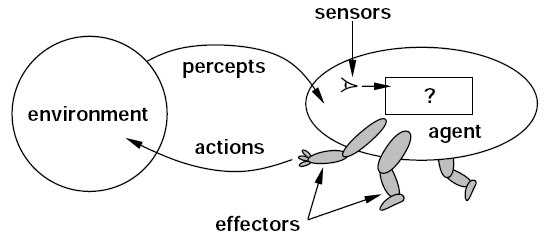
Understand the current state. Choose the next action. Use the tool. Read the result. Continue.
The important part is not that the AI has more buttons to press. The important part is that each tool extends the distance between the original instruction and the final result the system can produce.
A language model gives the agent reasoning and generation. Tools give that reasoning a place to act.
The Agent Can Keep the Work Moving
Once tools exist, the next change is continuity.
Many useful tasks are not one action. They are a chain.
A research task may begin with several sources, continue into extraction and comparison, then end in a structured document. A coding task may require reading a repository, changing files, running tests and preparing the result. A business task may begin with data in one application and finish as a report or presentation in another.
The agent model is designed around that sequence.
Instead of requiring the user to manually copy every intermediate result into the next prompt, the system can preserve the state of the task and use earlier work as the starting point for the next step.
This is where AI starts to feel less like a conversation and more like a workspace.
The user still defines the objective. The system carries more of the path between the beginning and the deliverable.
That path can include reading, organizing, generating, checking, calculating, writing and creating artifacts. The exact tools change by product. The pattern does not.
The task keeps moving because the system remembers where the work is.
Files and Applications Become Part of the Context
Real work already has a location.
It lives in documents, spreadsheets, email, calendars, project systems, websites, code repositories and previous decisions.
Work agents become more useful when they can operate close to that material.
OpenAI’s current Work experience is built around longer multi-step work and finished deliverables. It can work with connected information and create documents, spreadsheets, presentations, reports and other outputs. Microsoft describes Copilot Tasks as an agent that can work across apps and services with its own computer and browser.
The important change is not the number of integrations.
It is that the user can start closer to the real objective.
Instead of downloading a file, copying parts of it into a chat, requesting an analysis, copying the analysis into another application and rebuilding the final output manually, the workflow can increasingly stay connected from source material to deliverable.
That makes context part of the product.
The agent can know which files belong to the task, which application is being used, what has already been completed and what still needs to happen.
Human Checkpoints Become Part of the Workflow
More execution does not remove the user from the process.
It changes where the user becomes most useful.
Instead of directing every small step, the user can define the goal, provide context, review progress and approve important actions when the workflow reaches them.
Current agent products are being designed around that pattern.
OpenAI lets users follow progress, answer questions and redirect work while it is happening. Microsoft describes consent points for meaningful actions inside Copilot Tasks. Anthropic’s work on agent design also emphasizes clear human control and understandable system behavior.
This creates a practical division of work.
The agent handles the sequence. The person handles intent and judgment.
That is more useful than treating autonomy as the goal by itself. A strong work agent should know when it has enough information to continue and when the next decision belongs to the user.
The result is not AI replacing the workflow.
The workflow becomes shared.
Finished Deliverables Change What Users Delegate
A response is useful when the user needs information.
A deliverable is useful when the user needs work completed.
That distinction changes the kinds of requests people can hand to AI.
A user can ask for a summary. A work agent can potentially read the source material, identify the important information, organize it for the intended audience and return a document ready for review.
A user can ask how to analyze a spreadsheet. A work agent can potentially inspect the data, perform the analysis, build the tables and produce the file.
A user can ask how a website should be changed. A work agent can potentially inspect the project, make the edits, test the result and return the updated artifact.
The value comes from collapsing several handoffs into one bounded piece of work.
The user no longer has to treat AI as one stop inside every process. In more workflows, AI can stay with the task until the result exists.
That is what turns agentic AI from a different interface into a different way of delegating work.
Longer-Horizon Work Is Becoming a Real Product Category
The clearest sign of this shift is the length of the tasks people are beginning to hand over.
OpenAI reported in June 2026 that 70.2% of sampled individual Codex users had made at least one request by May 2026 that its task-horizon methodology estimated would take a person more than one hour.
The important part is not the percentage by itself.
It shows what people are starting to expect from the interface.
The request is becoming larger.
First AI answered questions. Then it drafted content. Then it analyzed files. Now systems are being built to use tools, keep state, move across applications and return finished artifacts.
That progression changes the role of the user as well.
The person spends less time carrying information between steps and more time defining the objective, supplying the right context and deciding whether the finished result is the one they wanted.
The chatbot waits for the next prompt.
The work agent keeps moving toward the result.
That is the upgrade.