Google Gemini 3.8 Flash is a production-ready AI model built for long-horizon software engineering, autonomous agents and complex workflows, with a 1M-token context window and a broad set of built-in tools.
The Short Version
Google has launched Gemini 3.8 Flash, a new production-ready model built for long-horizon software engineering, autonomous agents and complex multi-step workflows. Google describes it as its most intelligent Flash model yet. It combines a 1 million-token context window with built-in tools for code execution, file search, function calling, Search grounding, Google Maps grounding, structured outputs and computer use in preview.
Flash Is Becoming an Agentic Workhorse
Gemini 3.8 Flash pushes Google’s Flash line deeper into agentic work. The model is designed for tasks that continue across many steps rather than ending after one prompt and one answer. That makes it a natural fit for coding agents, research workflows, application assistants and systems that repeatedly plan, call tools, inspect results and continue working.
Built for Long-Horizon Software Engineering
Google positions long-horizon software engineering as one of the core strengths of Gemini 3.8 Flash. The model is designed to stay engaged across larger coding jobs that involve several files, multiple tool calls and a sequence of related decisions. For developers, this points toward AI that can participate in a broader slice of the software workflow instead of focusing only on isolated code snippets.
Autonomous Agents Are a First-Class Use Case
Gemini 3.8 Flash is also engineered for autonomous agents. These systems can break a goal into steps, select tools, inspect their own progress and continue until a larger task is complete. Google is clearly treating agent orchestration as a central part of the model’s identity, which makes 3.8 Flash especially relevant for the next generation of AI-powered applications.
A 1 Million-Token Context Window
The model supports an input context window of 1,048,576 tokens. That gives developers a large working space for source code, documentation, long conversations, reports, project files and other context-heavy material. A large context window becomes particularly useful when an agent needs to keep many connected pieces of information available throughout a multi-step workflow.
Up to 65,536 Output Tokens
Gemini 3.8 Flash supports up to 65,536 output tokens. That creates room for substantial generated work such as detailed technical reports, large code changes, structured plans and long-form analysis. Combined with the 1 million-token input window, the model is set up for workflows where both the source material and the resulting output can be large.
Multimodal Inputs Are Built In
Google lists text, images, video, audio and PDFs as supported input types for Gemini 3.8 Flash. That means one agent can reason across several kinds of information without every workflow being reduced to plain text first. For applications that combine documents, screenshots, media and written instructions, this gives the model a much richer view of the task.
Code Execution Can Be Part of the Workflow
Gemini 3.8 Flash supports code execution as a built-in capability. This gives an application a way to move from reasoning about a technical task to running computations or validating generated logic inside the workflow. In agentic systems, that connection between thinking and execution can make the model more useful for data tasks, technical analysis and software development.
Computer Use Is Available in Preview
Google also lists computer use as a preview capability for Gemini 3.8 Flash. Computer use allows an AI system to interact with graphical software and interfaces as part of a larger task. Combined with planning and tool use, it points toward applications that can move through real digital workflows rather than operating only inside a chat box.
Function Calling Supports Connected Applications
Function calling is supported, giving developers a direct way to connect Gemini 3.8 Flash with application logic and external tools. An agent can decide when a function is needed, request the appropriate action and use the returned information as part of the next step. This is one of the core building blocks behind practical AI assistants that can work with live systems.
File Search Helps Agents Work Across Project Material
File search is another built-in capability. For agents working with project documents, technical references or large collections of material, file search can provide a direct retrieval layer inside the model workflow. That helps turn a large document set into active working context instead of something a user has to manually copy into prompts.
Search Grounding Connects the Model to Fresh Information
Gemini 3.8 Flash supports grounding with Google Search. For applications that need current public information, this gives the model a path to bring fresh web context into its reasoning process. Grounded search is especially useful for research agents, information assistants and applications that need to combine model reasoning with up-to-date external material.
Google Maps Grounding Opens Another Data Layer
The model also supports grounding with Google Maps. That creates interesting opportunities for applications involving places, travel, business discovery and geographic context. When combined with agentic planning, Maps grounding can become one more specialized information source that an AI system can call as it works through a real-world task.
Structured Outputs Help Applications Stay Organized
Structured outputs are supported in Gemini 3.8 Flash. This allows developers to request predictable machine-readable response formats for application workflows. Agents often need to pass results from one step to another, so structured outputs can make it easier to turn model responses into data that software can reliably process.
Thinking Levels Can Be Tuned
Google provides low, medium and high thinking levels for Gemini 3.8 Flash. This gives developers a way to shape how much reasoning effort the model applies to different classes of tasks. A lightweight interaction and a complex multi-step engineering job can therefore use different reasoning settings while staying on the same model.
URL Context Expands What an Agent Can Work With
URL context is supported as well. This gives applications another convenient way to bring external material into a task without manually reformatting everything into a prompt. For research, documentation and web-based workflows, direct URL context can help an agent move more smoothly between source material and generated work.
Caching Supports Repeated Workflows
Gemini 3.8 Flash supports caching, which is useful when an application repeatedly works with the same large body of context. Long-running agents often revisit project instructions, codebases or reference material across several steps. Caching gives developers another tool for building persistent workflows around substantial shared context.
Gemini 3.8 Flash Is Generally Available
Google lists Gemini 3.8 Flash as generally available and ready for production use. The stable model ID is gemini-3.8-flash. That production status matters for developers because Google is positioning the model for real applications, agent systems and enterprise workflows now.
Google AI Studio Is One Starting Point
Developers can start working with Gemini 3.8 Flash through Google AI Studio and the Gemini API. AI Studio gives builders a direct environment for testing prompts and model behavior, while the API provides the path into custom applications. This makes the new Flash model immediately accessible to both rapid experimentation and production development.
Gemini Enterprise Adds a Business Deployment Path
Google is also making Gemini 3.8 Flash available through Gemini Enterprise. That gives organizations a deployment path for agentic and multi-step workflows using Google’s enterprise AI platform. The same model can therefore sit behind individual developer experiments and larger managed applications.
Antigravity Uses Gemini 3.8 Flash by Default
Google’s documentation says the Antigravity agent and Antigravity SDK use Gemini 3.8 Flash by default. That is a strong signal about where Google sees the model fitting: at the center of agent workflows that need planning, tool orchestration and sustained work across multiple steps.
The Gemini App Is Part of the Rollout
For consumers, Google says Gemini 3.8 Flash is available to Google AI Pro and Ultra subscribers in the Gemini app. This gives the model a consumer-facing route alongside the developer and enterprise paths, bringing its new reasoning and agentic capabilities into Google’s broader AI ecosystem.
AI Mode in Google Search Also Gets 3.8 Flash
Google is also bringing Gemini 3.8 Flash to AI Mode in Google Search for Google AI Pro and Ultra subscribers. That puts the model’s reasoning capabilities directly inside one of Google’s most widely used information products and shows how the Flash line is becoming part of more than standalone AI tools.
Gemini in Sheets Is Included
Gemini 3.8 Flash is also available in Gemini in Google Sheets for eligible subscribers. Spreadsheet work is a natural place for reasoning, structured data and multi-step assistance to come together. The inclusion of Sheets shows how Google is extending the model into everyday productivity workflows as well.
Google Demonstrated an Entire 3D Game From One Prompt
One of Google’s launch demonstrations shows Gemini 3.8 Flash building a functional 3D game from a simple prompt using a looping instruction inside Google Antigravity. The demo combines puzzles, environmental storytelling and generated textures, providing a vivid example of the model working through a creative software task rather than producing only a short piece of code.
A DOS-Style Google Maps Demo Shows Its Range
Google also demonstrated Gemini 3.8 Flash creating a playable DOS-style version of Google Maps from a single prompt in Antigravity. The result includes locations, directions and Street View. It is a playful showcase, but it also demonstrates the model’s ability to combine interface work, application logic and connected information inside one generated experience.
Hardware Anatomy Turns Device Teardowns Into Interactive 3D
Another Google demo, Hardware Anatomy, uses Gemini 3.8 Flash in Google AI Studio to generate interactive Three.js visualizations of hardware devices. The experience breaks a device into layers that can be explored with a deconstruction slider. It is a strong example of the model combining technical understanding with visual software generation.
Introductory API Pricing Starts at $0.75 Per Million Input Tokens
Google lists introductory Gemini 3.8 Flash pricing at $0.75 per million input tokens and $3.75 per million output tokens through December 31, 2026. That pricing gives developers a clear entry point for experimenting with long-context, tool-using and agentic applications on the new model.
Why This Launch Matters
Gemini 3.8 Flash brings several trends together in one model: large context, multimodal input, built-in tools, configurable reasoning, computer use and a strong focus on autonomous agents. The important shift is that Flash is becoming a workhorse for applications that can keep going, use tools and complete larger digital tasks.
The Upgrade Feeling
The most interesting thing about Gemini 3.8 Flash is how much of the modern AI workflow now fits inside one fast model tier. A developer can give it a large project context, connect functions and search, let it execute code, bring in files, ground its work with live information and build an agent around the same model. That feels less like a simple model update and more like a new foundation for software that can actually work through a task.
AI Is Adding a New Layer Between the App and the Hardware
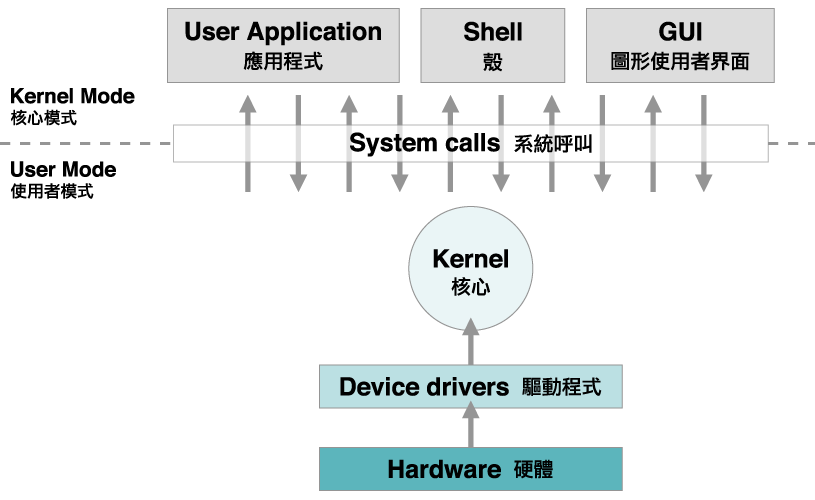
For most of computing history, the operating system sat between applications and hardware.
An app asked for memory. The operating system managed memory.
An app wanted a file. The operating system exposed a file system.
An app needed graphics. The operating system provided graphics APIs and drivers.
AI is beginning to add another layer to that relationship.
An application may need a language model, an image model, speech recognition, semantic search or a custom ONNX model. That model may run on the NPU, GPU or CPU. It may already be distributed by the operating-system vendor. It may be downloaded locally. It may run in a private cloud environment. It may come from another model provider.
The app increasingly does not have to manage every one of those pieces by itself.
Windows, Apple platforms and Android are all building system-level AI frameworks that sit between the application and the underlying model execution path.
The exact architecture differs by platform.
The direction is similar.
The operating system is becoming part of how an application reaches AI.
Model Selection Is Becoming an Application Architecture Decision
An AI feature no longer has to begin with one fixed model endpoint.
A developer can start with the task.
Does the feature need short text generation on the device?
Does it need a larger context window?
Does it need a custom model trained for one domain?
Does it need to work offline?
Does it need a cloud model for a larger workload?
Those questions can determine where inference happens and which model is used.
Microsoft documents this directly in its Windows AI guidance. Windows applications can combine Windows AI APIs, Foundry Local, Windows ML and cloud AI services in the same product.
Apple’s Foundation Models framework now exposes a common LanguageModel protocol that can represent Apple Foundation Models, Private Cloud Compute models and other providers that conform to the protocol.
Android’s AI guidance similarly separates on-device Gemini Nano, custom local models and cloud Gemini options, and its Agent Development Kit can combine local and cloud models in the same multi-agent system.
The model becomes one component inside the application architecture.
The operating system provides more of the machinery around that choice.
Windows Now Exposes Several AI Paths Inside One Platform
Windows provides a clear example because Microsoft now documents several AI layers under one Windows AI platform.
Windows AI APIs expose ready-to-use capabilities such as language models, OCR, semantic search, imaging and other built-in features on supported hardware.
Foundry Local provides local language and speech models through a runtime designed for on-device use.
Windows ML gives developers a way to bring their own ONNX models and run them locally.
Cloud APIs remain another path when an application is designed to use remote AI services.
Microsoft explicitly says these options can be combined inside the same application.
That changes the way a Windows AI feature can be designed.
The developer can treat Windows AI as a set of execution layers instead of treating every model as a separate infrastructure project.
One feature might call a built-in Windows AI API.
Another might use a local open model through Foundry Local.
A third might use a custom ONNX model through Windows ML.
Another workflow can connect to cloud AI.
The application can choose the path that matches the task.
Windows AI APIs Can Route Supported Workloads to Local Accelerators
The routing concept becomes more literal when hardware enters the picture.
Modern PCs can contain several compute engines.
The CPU remains the general-purpose processor.
The GPU provides highly parallel compute.
The NPU provides dedicated neural-network acceleration on supported systems.
Microsoft’s current Windows AI guidance says supported Windows AI APIs can route inference through the NPU automatically on Copilot+ PCs, while some APIs can also use GPU or CPU paths on other supported Windows 11 hardware.
That means the application can call a platform API without directly implementing every hardware-specific inference path itself.
The operating system and runtime know more about the machine underneath.
They can expose a higher-level capability to the app.
This is the same pattern operating systems have used for graphics, audio and networking for years.
The application asks for a capability.
The platform handles more of the device-specific execution underneath.
AI is moving into that model.
Windows ML Can Select Execution Providers Across CPU, GPU and NPU
Windows ML goes deeper into hardware-aware inference.
It uses ONNX Runtime and supports execution providers that map model execution to different processors.
Microsoft documents providers for CPU, GPU and NPU acceleration, including hardware-specific providers from AMD, Intel, NVIDIA and Qualcomm.
Some execution providers can be dynamically downloaded through Windows ML and maintained through the Windows platform rather than being bundled independently inside every application.
The framework can also use device policies or explicit developer selection to choose an execution provider.
That makes the operating system part of the model-to-hardware path.
The model itself can remain an ONNX model.
The execution layer decides which compatible processor and provider will run it.
This separates the AI workload from some of the hardware plumbing beneath it.
For developers, the same model can participate in a Windows execution stack that understands CPU, GPU and NPU options.
For the operating system, AI inference becomes another workload that can be mapped onto the hardware available in the machine.
Foundry Local Adds Model Selection Above the Hardware Layer
Foundry Local adds another level to the Windows stack.
Instead of requiring the application to package one specific local model implementation, the runtime can expose models through aliases and a local API.
Microsoft says Foundry Local detects available hardware and can serve a hardware-optimized model variant for the device.
Its current Windows documentation describes support across Qualcomm NPU paths, DirectX 12 GPUs, NVIDIA CUDA and CPU execution depending on the model and hardware configuration.
The application can therefore ask for a model by the interface provided by the runtime while Foundry Local handles more of the relationship between the model package and the machine.
This is another form of routing.
At one layer, the app chooses a local model family.
At another layer, the runtime selects the hardware-compatible execution path.
The application can then keep the same higher-level code across several hardware configurations.
That is the kind of abstraction operating systems are designed to provide.
Apple Is Building a Common Model Interface Into Its Developer Stack
Apple is approaching the same architectural idea through the Foundation Models framework.
At WWDC26, Apple expanded the framework so applications can work with multiple language-model sources through a common LanguageModel protocol.
Apple’s developer documentation says that can include the on-device Apple Foundation Model, the Apple model running through Private Cloud Compute and other providers such as Claude or Gemini when they conform through the framework.
The important part is the shared interface.
The application can build around a language-model abstraction rather than designing every feature around one provider-specific call shape.
Apple also added Dynamic Profiles that can swap models, tools and instructions during a continuous session.
That moves model choice closer to runtime application behavior.
One task can use one model configuration.
Another task can use another.
The surrounding application can keep the same framework structure.
The model becomes replaceable inside a larger session architecture.
Private Cloud Compute Extends the Same Apple Session Beyond the Device
Apple’s on-device and server-side models show how one application framework can span two compute locations.
The SystemLanguageModel runs on the device.
PrivateCloudComputeLanguageModel runs through Apple’s Private Cloud Compute infrastructure.
Apple documents both through the Foundation Models framework and the LanguageModel protocol.
Its current documentation lists a 4K context size for the on-device model and a 32K context size for the Private Cloud Compute model, with additional reasoning capability on the server-side option.
The application can create a LanguageModelSession with either model type while retaining the same broader session API, tools and instructions.
That is a direct example of model routing at the application-framework level.
The developer decides which execution target fits the feature.
The framework keeps the interaction model consistent.
The location of the model can change without requiring the entire application architecture to change with it.
The model endpoint becomes one parameter inside the session.
Core AI Adds a Bring-Your-Own-Model Path on Apple Silicon
Apple is also adding a lower-level path for developers who want to run their own models locally.
At WWDC26, Apple introduced Core AI as a framework built into the operating system for running AI models on Apple Silicon.
Apple describes Core AI as a way to load, specialize and run models on-device through a native Swift API.
That gives the platform two different model layers.
Foundation Models provides access to Apple models and provider abstractions for language-model sessions.
Core AI provides a path for custom on-device models.
The combination is similar to what is happening on Windows.
There is a high-level model service for common AI capabilities.
There is also a lower-level runtime for custom models.
Both sit inside the operating-system developer stack.
The app can choose how much of the model management it wants the platform to handle.
Android Uses AICore as a System Service for Gemini Nano
Android places the operating-system layer directly between applications and its on-device foundation model.
Gemini Nano runs through AICore, an Android system service.
Google says AICore manages model distribution, future model updates, safety functions and the use of on-device hardware acceleration.
Applications can access Gemini Nano through ML Kit GenAI APIs instead of independently packaging the foundation model and its runtime.
That changes the deployment model for on-device AI.
The application does not have to treat a large model file as ordinary app content.
The operating system can provide the model as a shared system capability.
The same platform layer can manage updates and connect inference to supported hardware.
Google’s current documentation describes Gemini Nano as running through AICore for tasks including summarization, rewriting, image description, speech recognition and custom prompting through ML Kit interfaces.
Android is therefore turning the foundation model into an operating-system service that applications can call.
Android Can Combine On-Device and Cloud Models in One Agent System
Android’s agent framework extends the model-selection idea beyond one model at a time.
Google’s Agent Development Kit for Android supports on-device Gemini Nano through ML Kit and cloud Gemini models through cloud integrations.
Its documentation also describes a hybrid multi-agent pattern where a cloud model can act as the root orchestrator while on-device Gemini Nano sub-agents handle selected tasks locally.
That is a different kind of routing.
The decision can happen at the agent level.
One part of the system can use cloud compute.
Another part can run on the phone.
The application can organize those models as cooperating agents inside one workflow.
This matters because future AI applications may not have one universal model call.
They may contain several model roles.
The operating system and its AI frameworks provide the runtime environment in which those roles can be assigned.
The Router Is Also Becoming a Model-Management Layer
Routing is not only about choosing local or cloud.
It is also about managing the model once it becomes part of the device.
Android AICore manages Gemini Nano distribution and updates.
Windows can manage shared ONNX Runtime components and dynamically acquired execution providers through Windows ML.
Foundry Local can manage model catalogs and hardware-optimized variants.
Apple provides system models directly through Foundation Models and adds Core AI for custom on-device execution.
These are different implementations, but they move the same category of work upward into the platform.
The application can depend on an operating-system AI service instead of independently rebuilding distribution, runtime selection, hardware mapping and update logic for every feature.
That gives AI a more conventional place inside software architecture.
The model starts to look less like a separate product bolted onto an app.
It starts to look like a compute resource exposed through the platform.
Applications Can Start Choosing Models by Task Instead of by Brand
A common model interface changes how developers can think about application design.
The first question can become: what does this task need?
A short offline summarization feature may fit an on-device model.
A long document workflow may use a server model with a larger context window.
A specialized vision feature may use a custom local model.
A background classification task may run through a built-in AI API.
A multi-agent workflow may divide work between local and cloud models.
Windows, Apple platforms and Android now all expose pieces of that architecture.
The details remain platform-specific, and the developer still defines the product logic.
But model identity is becoming easier to separate from feature identity.
The feature can be designed around a capability.
The runtime can then connect that capability to the model and compute path selected for the task.
That is the practical meaning of the operating system becoming a model router.
The Operating System Is Becoming Part of the AI Runtime
The operating system has always decided how applications reach hardware and shared system services.
AI is becoming another part of that responsibility.
Windows can expose built-in models, local open models, custom ONNX models, execution providers and cloud paths inside one developer platform.
Apple can expose an on-device foundation model, a Private Cloud Compute model, third-party language-model providers and custom Core AI models through its developer stack.
Android can expose Gemini Nano through AICore, custom local models through its AI toolchain and cloud models through hybrid application architectures.
The common idea is not that one operating system automatically chooses every model for every application.
The common idea is that model access, execution and hardware mapping are moving into platform APIs that applications can build around.
That is what turns the operating system into an AI model router.
The application defines the task.
The platform provides more ways to connect that task to the model and compute path that will run it.
That is the upgrade.