AMD Put Personal AI at the Center of IFA 2026
AMD used the opening keynote at IFA Berlin 2026 to describe a future in which AI becomes a much more personal part of everyday computing. Jack Huynh, senior vice president and general manager of AMD’s Computing and Graphics Group, presented the idea as a shift in the relationship between people and their devices. Instead of treating AI as a separate destination, AMD’s vision places intelligence directly into the computing experience, close to the user and ready to support the work, ideas, and creative moments already happening on the device.
The PC Is Moving From Tool to Partner
The strongest idea in AMD’s keynote is simple: the PC can become something that works alongside the person using it. IFA described this as computing evolving from a tool we use into an extension of human potential. That changes the role of the machine. A traditional computer waits for a command, opens an application, and carries out a task. AMD’s Personal AI vision adds a new layer where the system can understand what the user is trying to achieve and help move that intention toward a useful result.
Context Becomes Part of the Interface
Personal AI becomes more interesting when the system understands context. IFA’s official keynote description says the next generation of agentic PCs can understand what the user is doing, what they want to achieve, and what matters in that moment. That creates a more natural way to interact with technology because the system is no longer limited to one isolated command at a time. The computer can begin to connect the current task, the user’s goal, and the tools available on the device into a more continuous experience.
Agentic PCs Are Designed to Work Proactively
AMD’s vision also moves beyond AI that only responds when someone asks a question. The keynote focused on more proactive computing, where an intelligent system can work alongside the user and help advance a task. That is the basic promise behind the agentic PC: a machine that can participate in a workflow instead of acting only as a passive endpoint. For creators, developers, and everyday users, this points toward computers that can help organize steps, coordinate tools, and keep progress moving with less friction.
On-Device Intelligence Makes AI Feel More Personal
The IFA program puts on-device intelligence at the center of the Personal AI idea. When more intelligence lives on the device, the experience can stay closer to the person using it and respond directly to the local context of the task. IFA specifically highlighted user control and privacy as benefits of this model. For TUF, the bigger story is the change in interaction: local intelligence gives the PC a chance to become a persistent part of the user’s workflow rather than a separate service that always feels one step removed from the machine itself.
Local Compute Gives the PC a Bigger Role
AMD has been steadily expanding the amount of AI work that can happen on end-user devices, and the IFA keynote connects that hardware direction to a broader experience. Local compute is not only about raw performance. It is what gives Personal AI room to become responsive, available, and closely connected to the applications already running on the system. As CPUs, GPUs, NPUs, memory, and software continue to improve together, the PC becomes a much more capable home for AI-assisted work, creation, and experimentation.
AI-Powered Devices Become Part of the Workflow
AMD’s event page describes the keynote as a look at what becomes possible through AMD AI-powered devices. That phrase matters because it places AI inside the device experience rather than around it. A personal system can become the place where ideas begin, where local models assist with work, where creative tools gain new intelligence, and where agents can coordinate steps across applications. The result is a computing model in which AI is not a single feature. It becomes part of the way the whole device supports the user.
Creativity Is a Core Part of AMD’s Vision
AMD and IFA both framed Personal AI around imagination and creativity, not only productivity. The keynote description points to artists, creators, and innovators as people who can gain new ways to turn ideas into something real. That is a strong direction for the next generation of personal computing. A context-aware system can help move from an early idea to research, drafting, visual exploration, code, media, or other creative outputs while keeping the person in control of the direction.
Personal AI Can Help Turn Intention Into Action
One of the clearest phrases in IFA’s description is the idea of turning imagination into action. That captures what makes agentic computing different from a normal assistant. The system does not only provide an answer; it can help move toward an outcome. A user might begin with a goal, and the PC can help translate that goal into a sequence of useful steps. As more applications expose AI-ready workflows, that connection between intention and execution could become one of the defining experiences of a Personal AI computer.
The Workplace Becomes More Collaborative
IFA’s post-keynote coverage also highlighted the workplace. The event described AI as a way to reduce repetitive work and make collaboration across different parts of a business easier. In AMD’s Personal AI model, the computer becomes an active participant in that environment. It can help prepare information, support creative work, coordinate tasks, and keep useful context close to the employee. That makes the PC more than a collection of applications. It becomes a workspace where intelligence can connect those applications around the person’s actual objective.
Open Infrastructure Expands the Possibilities
Another important part of AMD’s direction is openness. IFA’s official profile for Jack Huynh describes his Personal AI vision as a combination of powerful local compute, open software ecosystems, and intelligent cloud services. Open ecosystems give developers more ways to build, experiment, and connect new experiences across hardware and software. For users, that can translate into a wider range of tools and workflows. For developers, it creates more room to build Personal AI experiences that fit different devices, applications, and ways of working.
Consistent Software Helps Ideas Move Across Systems
IFA’s keynote recap emphasized open infrastructures and consistent software as foundations for developing and deploying AI applications across an organization. That gives AMD’s vision another useful dimension. Personal AI can begin on a local device, but the software around it can help the same ideas travel into larger workflows when needed. A developer can experiment close to the user, refine the experience, and connect it to broader systems. That continuity is especially valuable as AI becomes part of more everyday applications rather than remaining inside isolated demos.
Local and Cloud Intelligence Can Work Together
AMD’s Personal AI direction is not limited to one location for compute. IFA describes a model that brings together local compute and intelligent cloud services. That creates a flexible architecture in which the personal device can handle experiences that benefit from being close to the user while larger services can contribute additional capability when a workflow calls for it. The exciting part is the continuity between the two. The user can remain at the center while the computing environment chooses the resources that best support the experience.
The Hardware Stack Matters More in the Personal AI Era
A Personal AI PC depends on more than a single accelerator. Jack Huynh’s role at AMD spans the company’s PC and graphics businesses, and AMD describes its end-user strategy around leadership CPU, GPU, and NPU technologies. That broader stack is important because modern AI experiences combine many kinds of work: general computing, graphics, model inference, media processing, and application logic. Bringing those capabilities together gives device makers and software developers a richer foundation for building AI experiences that feel integrated with the rest of the PC.
The User Becomes the Center of the System
The phrase Personal AI only works if the technology genuinely revolves around the person. That is why context, adaptation, local intelligence, and user control appear repeatedly in the IFA description of AMD’s keynote. The system is valuable because it understands the current goal and helps the user move forward. This is a different design philosophy from adding an AI button to an existing application. It suggests that the entire computing environment can become more responsive to the person, the task, and the moment.
IFA 2026 Made the Direction Clear
IFA gave AMD a large stage for this message. The opening keynote took place on September 4, 2026, on the Innovation Stage in Berlin, with Personal AI presented as one of the defining themes of the next computing era. That positioning matters because it connects AMD’s hardware work to a clear experience goal. The company is not only talking about faster AI processing. It is describing what that processing is meant to enable: more personal, proactive, context-aware computing that works alongside people.
Personal AI Is Becoming a Platform Idea
The most important takeaway from AMD’s keynote is that Personal AI is bigger than one feature or one model. It is a platform idea built around local hardware, software, applications, agents, and cloud services working together. When those layers are designed around the user, the PC can become a place where intelligence is always available as part of the workflow. That creates room for entirely new categories of software, from context-aware creative tools to personal agents that can coordinate work across multiple applications.
What This Means for the Next Generation of PCs
The next generation of PCs can be judged by more than processor speed, display quality, or battery life. Personal AI adds another question: how well does the system understand and support what the user is trying to do? AMD’s IFA vision points toward devices where AI capability is woven through the experience, from local models to agentic workflows and creative tools. That gives PC makers a new design space and gives software developers a larger canvas for building experiences that feel more adaptive, useful, and personal.
The Upgrade Feeling
AMD’s Personal AI keynote captures a shift that feels bigger than adding another AI feature to the PC. The idea is to make intelligence part of the machine itself: close to the user, aware of context, ready to help, and connected to the tools that turn ideas into results. If that direction continues to mature, the upgrade people notice may not only be a faster computer. It may be a computer that feels more capable of understanding what they want to create and helping them get there.
Apple’s Siri AI changes the assistant in a way that goes beyond better answers. The new Siri has a dedicated app, private cross-device conversation history, personal-context search across messages, email and photos, onscreen awareness, systemwide app actions, web knowledge and a rebuilt Apple Intelligence architecture spanning on-device models and Private Cloud Compute. The larger shift is persistence: Siri is no longer designed only as a temporary voice overlay that disappears after one command. Apple is turning it into an AI layer users can return to, continue across devices and use to act inside the operating system.
Siri’s Biggest Upgrade May Be That It No Longer Disappears
Traditional Siri was designed around a moment.
You invoked it.
You asked for something.
It answered or performed a command.
Then the interface disappeared and the interaction was effectively over.
That model made sense for a voice assistant built around short requests such as timers, calls, weather, music and device settings.
It is a weak model for modern AI.
Longer conversations need continuity.
Personal questions need context.
Complex tasks often begin in one app and finish in another.
A useful assistant also needs somewhere for the user to return to when the conversation matters later.
Apple’s new Siri AI changes that structure.
The new system still works from voice, the side button and system surfaces.
But Apple has also created a dedicated Siri app that preserves conversation history and privately synchronizes it across supported Apple devices.
That is a much deeper product shift than simply improving speech recognition.
Siri is becoming a place.
Apple Introduced Siri AI at WWDC26
Apple introduced Siri AI on June 8, 2026 as part of the next generation of Apple Intelligence.
The company describes it as an entirely new version of Siri rather than an incremental update to the old assistant.
Apple says the new system is deeply integrated across iPhone, iPad, Mac, Apple Watch and Apple Vision Pro.
Its core capabilities include personal context understanding, broad world knowledge, onscreen awareness, richer conversation and more systemwide app actions.
The timing needs to be described carefully.
Siri AI is available for developer testing on supported platforms.
Apple says a user beta will arrive later in 2026 for supported devices set to English, with more languages to follow.
So this is not a feature that every iPhone user can simply turn on today.
Apple has unveiled the architecture and begun developer testing.
The consumer rollout is still ahead.
The Dedicated Siri App Changes the Product Model
The new dedicated Siri app may look like a small interface decision.
It changes the mental model of the assistant.
A voice overlay is transient.
An app is persistent.
Apple says users can open the Siri app to start a new conversation or revisit an old one.
That means a Siri interaction can now have a history the user intentionally returns to.
A travel-planning discussion can remain available.
A research conversation can continue later.
A chain of questions can become a reusable object rather than a series of disconnected requests.
This moves Siri closer to the interaction pattern users already understand from modern AI assistants while keeping Siri embedded in the operating system.
The assistant is no longer only summoned.
It can also be opened.
Conversation History Can Follow the User Across Devices
Apple says the Siri app uses iCloud to privately synchronize conversational history across a user’s products.
A conversation can begin on Mac and continue on iPhone, iPad, Apple Watch or Apple Vision Pro.
That makes the conversation itself part of the Apple ecosystem.
The device becomes less important than the ongoing context.
A user can begin a detailed question on a large screen, leave the desk and continue from a phone.
The important architectural idea is continuity.
Old Siri interactions were tied strongly to the moment and device where they happened.
Siri AI is designed so the assistant can preserve a thread beyond both.
Apple describes the synchronization as private, but the exact privacy boundaries still depend on Apple’s implementation and the broader iCloud and Apple Intelligence architecture.
The useful confirmed point is that conversational history is now deliberately cross-device.
Personal Context Turns the User’s Own Data Into Searchable Assistant Context
Apple says Siri AI can draw on personal context across messages, emails, photos and other information.
That changes the kinds of questions Siri can answer.
The user no longer has to know which app contains the information.
They can ask for something conceptually.
Find the restaurant recommendation a friend sent.
Surface an old hotel confirmation.
Find photos from a particular trip.
The assistant’s job becomes resolving the intent and locating the relevant personal information.
Apple also says personal context can extend into third-party apps when developers integrate with Spotlight.
That last detail matters.
The architecture is not supposed to depend only on Apple’s first-party apps.
Spotlight becomes part of the bridge between app data and the assistant’s understanding.
The Spotlight Index Is Becoming AI Infrastructure
Spotlight has traditionally been understood as search.
Type a filename.
Find an app.
Locate a message.
Siri AI gives that index a second role.
Apple says the new system orchestrator can tap into the Spotlight index on device when handling requests.
That means indexed application information can become structured context for the assistant.
The distinction is useful.
The AI model does not necessarily need every personal file copied into one giant prompt.
The operating system already has mechanisms that know where user information lives.
The assistant can use those mechanisms as tools.
This is one of Apple’s strongest structural advantages.
It owns the OS services sitting between the model and the user’s data.
Onscreen Awareness Makes the Current Interface Part of the Prompt
Siri AI can also reason about content currently visible on the user’s screen.
That sounds simple, but it removes a common friction point in assistant interfaces.
Without onscreen awareness, the user has to explain context manually.
“I’m looking at this message.”
“This is the page I mean.”
“This image contains the thing I’m asking about.”
Apple says Siri AI can answer questions related to onscreen content and continue from there.
The screen itself becomes context.
That matters because many useful computer tasks begin with information already in front of the user.
A message.
A webpage.
A file.
A photograph.
A document.
The assistant can potentially start from that state rather than asking the user to restate it.
Systemwide App Actions Are Where Siri Stops Being Only a Chatbot
Conversation becomes more valuable when it can produce an action.
Apple says Siri AI can perform more systemwide app actions.
The examples include drafting email, editing and sharing photos and moving information into other applications.
This is different from a standalone chatbot that can explain what the user should do but cannot operate the system.
Apple controls the app frameworks, operating system permissions and integration surfaces required to make supported actions possible.
That gives Siri an advantage that is architectural rather than purely model-based.
Apple does not need Siri to be the largest general-purpose model in the world if the assistant can reliably act inside the environment where the user already works.
The operating system itself becomes part of the capability.
App Toolbox Gives the Orchestrator a Controlled Action Surface
Apple says Siri AI uses a system orchestrator that can access core capabilities including App Toolbox.
Apple’s public description does not expose every internal implementation detail of App Toolbox.
What it confirms is that the toolbox operates on device and is part of how Siri reaches supported app capabilities.
That is a useful model for personal AI.
The language model should not be imagined as directly controlling arbitrary application internals.
The operating system can expose controlled action surfaces.
The orchestrator decides which system capability to use.
The model helps understand the request.
The app integration performs the supported operation.
This separation is important for reliability and privacy.
It also gives Apple a way to expand what Siri can do without turning every app into an unrestricted tool endpoint.
Broad World Knowledge Fixes One of Old Siri’s Most Obvious Weaknesses
Siri was historically strong at narrow device commands and much weaker at open-ended questions.
That difference became increasingly obvious once conversational AI systems became normal.
Apple says Siri AI can now use broad world knowledge and go to the web for up-to-date information on almost any topic.
The assistant can then continue with follow-up questions.
This matters because a personal assistant cannot live entirely inside personal data.
Some questions are about the user.
Others are about the world.
The new Siri is designed to move between those two contexts.
Find something in my messages.
Then answer a broader question about the place.
Then help me act on the result.
The assistant becomes more useful when those modes are connected rather than separate products.
Follow-Up Conversation Changes How Users Can Ask
Old voice assistants trained users to compress their intent into commands.
Speak clearly.
Ask one thing.
Wait for the result.
Modern conversational AI allows a different interaction style.
The user can start imprecisely.
Clarify.
Change direction.
Refer back to an earlier answer.
Apple says users can extend almost any Siri AI response into a richer conversation.
That is important because natural human requests are rarely perfectly specified on the first sentence.
Conversation becomes a correction mechanism.
Instead of requiring the user to formulate the ideal command, the system can use multiple turns to converge on what they mean.
That reduces the command-language feeling that defined earlier voice assistants.
The Camera Becomes Another Way to Give Siri Context
On iPhone, Apple is adding a Siri mode inside the Camera app.
The user can let Siri see what the camera sees and ask about the object or scene.
The important idea is not the individual examples Apple demonstrated.
It is the input channel.
Voice assistants originally received speech.
Chat assistants added text.
Siri AI is being designed around text, speech, screen content, personal context and camera input.
That makes the assistant multimodal in a much more system-integrated sense.
The camera is not simply uploading a picture into a separate chatbot.
It becomes another operating-system surface through which Siri can receive context and return information or supported actions.
Visual Intelligence Is Expanding Beyond the iPhone
Apple is also expanding Visual Intelligence with Siri across iPad, Mac and Apple Vision Pro.
On iPad and Mac, Siri AI integrates with Spotlight and systemwide context menus so users can ask about images, files or text.
On Vision Pro, the assistant can operate inside the spatial interface.
This expansion matters because Siri AI is not being designed as an iPhone-only feature.
Apple is building one assistant identity across different interaction environments.
Keyboard and screen on Mac.
Touch on iPad.
Voice and camera on iPhone.
Wrist interactions on Apple Watch.
Spatial interaction on Vision Pro.
The input method changes.
The assistant context is intended to persist.
Apple Rebuilt Siri Around a New Apple Intelligence Architecture
Apple says Siri was rebuilt from the ground up with AI at its core.
The architecture uses the next generation of Apple Foundation Models.
Some work runs on device.
More complex requests can use server-based models through Private Cloud Compute.
This hybrid structure is central to Apple’s strategy.
On-device processing reduces latency for some tasks and keeps more data local.
Cloud processing allows access to larger models when the request exceeds what the device can efficiently handle.
The interesting design question is not whether every request runs locally.
It is how the system decides what can stay local and what needs larger compute while preserving the privacy properties Apple is promising.
The System Orchestrator Is the Layer That Makes Siri More Than One Model
It is tempting to describe Siri AI as one new model.
Apple’s public architecture suggests something more modular.
The company says Siri AI uses a system orchestrator.
That orchestrator can tap the Spotlight index and App Toolbox, both operating on device.
The Foundation Models provide language and reasoning capability.
Private Cloud Compute provides larger server-side inference when needed.
System indexes provide personal context.
App tools provide actions.
The web provides current external information.
The product is therefore a coordinated stack rather than a single chatbot model.
That architecture is increasingly common in serious AI assistants.
The model interprets.
Tools retrieve.
The system acts.
The orchestrator decides how those pieces connect.
Private Cloud Compute Is Apple’s Answer to the Personal-AI Privacy Problem
A personal assistant becomes more useful as it gains access to more sensitive context.
That also increases the consequences of cloud processing.
Apple’s answer is Private Cloud Compute.
Apple says requests that require server-side Apple Intelligence models can run on Apple silicon in a system designed so personal data is not stored or made accessible to Apple.
The company also publishes software images and security material so outside researchers can inspect aspects of the system’s privacy claims.
Those are Apple’s stated design guarantees.
They should not be rewritten as a blanket claim that every Siri interaction is completely risk-free.
The more useful point is architectural.
Apple is trying to make cloud inference part of a privacy model rather than treating privacy as a policy added after the cloud request.
Private Cloud Compute Is Expanding Beyond Apple-Owned Data Centers
Apple announced another important change in June 2026.
Private Cloud Compute is expanding to selected third-party data centers.
Apple Security Research says the company is collaborating with Google and NVIDIA while extending PCC privacy commitments to those environments.
Apple also says it collaborated with Google on technologies behind the Gemini family to build the next generation of Apple Foundation Models used by Apple Intelligence.
That makes the architecture more nuanced than “Apple AI runs only on Apple hardware in Apple buildings.”
The company is expanding where computation can happen while trying to preserve the PCC security model around it.
For Siri AI, that means the assistant’s server-side intelligence is part of a broader distributed AI infrastructure.
Apple’s Advantage May Be Integration Rather Than the Biggest Model
AI assistant comparisons often begin with model benchmarks.
Reasoning.
Coding.
Knowledge.
Context length.
Those measurements matter.
They may not be the decisive Siri metric.
Apple owns the operating system.
It owns Spotlight.
It defines app integration frameworks.
It controls device identity and permissions.
It owns iCloud synchronization.
It controls the hardware on which on-device models run.
That allows Siri to compete through integration.
A model with access to the right personal context and trustworthy action surfaces can be more useful for a device task than a stronger model with no operating-system access.
Siri AI is Apple’s attempt to turn vertical integration into an AI product advantage.
The Dedicated App Also Makes Siri More Comparable to Modern AI Assistants
There is a product reason to give Siri an app beyond persistence.
Users now expect AI conversations to be browsable.
ChatGPT, Claude, Gemini and other assistants normalized conversation lists, long threads and return visits.
A voice overlay cannot compete with that interaction pattern by itself.
The Siri app gives Apple a place for longer answers and ongoing threads without abandoning systemwide invocation.
This creates a two-layer interface.
Siri can remain ambient when the request is quick.
Open the assistant app when the conversation becomes substantial.
That flexibility may be more important than forcing every AI interaction into voice.
Siri AI and Gemini on Android Are Converging on the Same Product Category
TUF recently covered Google Assistant disappearing from Android as Gemini takes over the assistant layer.
Siri AI is a related industry shift, but the interesting Apple story is different.
Google is replacing a legacy assistant layer with Gemini.
Apple is redesigning Siri while giving it persistent history, a dedicated app and deeper Apple Intelligence architecture.
Both directions point toward the same new category.
The mobile assistant is no longer a voice-command utility.
It is becoming a conversational AI layer connected to applications, personal context and device state.
The competition is moving from “Which assistant heard the command?” to “Which assistant understands the user’s ongoing context and can safely do something with it?”
The EU Rollout Shows How Deep Integration Creates Regulatory Friction
Siri AI’s deepest strength also creates one of Apple’s deployment problems.
Apple says Siri AI will not initially be available on iPhone, iPad or Apple Watch in the European Union.
The company attributes the delay to the Digital Markets Act and disagreements over requirements related to competing virtual assistants and access to private data and applications.
Mac and Apple Vision Pro users in the EU are expected to have access when using a supported language.
This is Apple’s position on the regulatory dispute, not a neutral legal conclusion about the DMA.
The technical lesson is still important.
An assistant that can access personal context and control apps sits much deeper inside the operating system than a standalone chatbot.
That makes interoperability rules harder to implement without changing security and permission boundaries.
China Has a Separate Availability Problem
Apple also says Siri AI and the new Apple Intelligence features will not be available in China while the company works through regulatory requirements.
That means the product launch will not be globally uniform.
Language support is another constraint.
The initial user beta is planned for supported devices set to English, with additional languages later.
So headlines describing Siri AI as the new default experience for all Apple users would be premature.
The architecture is global.
Availability is not.
Supported Hardware Still Matters
Siri AI depends on Apple Intelligence-capable hardware.
Apple’s June availability list includes newer iPhone models, iPhone 15 Pro and Pro Max, supported Apple silicon Macs and iPads, Apple Vision Pro and newer Apple Watch models under the specified pairing requirements.
That reinforces an important feature of Apple’s AI strategy.
The assistant is partly a hardware platform feature.
On-device models require sufficient compute and memory.
The privacy architecture depends partly on which tasks can execute locally.
Older devices therefore cannot simply receive every Siri AI capability through a software update.
The assistant upgrade also becomes an upgrade boundary for Apple hardware.
What Apple Has Actually Confirmed
Apple has officially introduced Siri AI as a new version of Siri powered by the next generation of Apple Intelligence.
Apple says it includes personal context understanding, broad world knowledge, onscreen awareness, systemwide app actions and richer follow-up conversation.
A dedicated Siri app stores conversations and privately synchronizes history across supported Apple products through iCloud.
Apple says Siri AI can use the Spotlight index and App Toolbox through a system orchestrator, with those core capabilities operating on device.
Apple Foundation Models run on device and on servers using Private Cloud Compute.
On iPhone, Siri mode is integrated into Camera, and Visual Intelligence expands across more Apple platforms.
Developer testing is underway.
Apple says an English-language user beta will arrive later in 2026.
Initial regional availability will exclude iOS, iPadOS and watchOS in the EU, and Siri AI will not initially be available in China.
What We Should Not Claim Yet
We should not say Siri AI is generally available to consumers today.
We should not claim every announced feature will behave identically when the public beta arrives.
We should not claim every third-party app automatically exposes personal context to Siri; Apple ties that extension to developer integration with Spotlight.
We should not say App Toolbox gives Siri unrestricted control of arbitrary applications.
We should not claim every request is processed entirely on device.
We should not describe Apple’s privacy claims as independently proven guarantees beyond the mechanisms and verification model Apple has published.
We should not present Apple’s interpretation of the EU DMA dispute as the only legal interpretation.
And we should not say Siri AI is available worldwide.
The announcement is substantial, but rollout, language support, app integration and real-world reliability still need to be tested.
The Bigger Shift Is From Assistant Invocation to Assistant Continuity
The old assistant era was built around invocation.
Say the wake phrase.
Give the command.
Receive the result.
The new AI assistant era is being built around continuity.
The system remembers the thread.
It understands information already on the screen.
It can search personal context.
It can reach current information from the web.
It can use operating-system tools to act.
It can continue across devices.
And there is finally a place where the user can return to the conversation later.
That is why the dedicated Siri app matters more than it first appears.
The biggest Siri upgrade may not be that it can answer better questions.
It is that Siri is no longer designed to disappear after answering them.
Your Camera Doesn’t Have to Follow the Subject Anymore — AI Can Reframe the Video After You Shoot It
For most of the history of video, framing happened while you were recording.
If a person moved left, you moved left. If they crossed the frame, you followed them. If you lost them behind someone else, the shot changed with them.
Samsung’s My FanCam on the Galaxy Z Fold8 series moves part of that job into editing.
The feature lets you open an existing video, choose a person and have the phone automatically track that person through the clip. It then reframes the footage around the selected subject and lets you choose an aspect ratio for the finished result.
Samsung explained the engineering behind My FanCam on September 1, 2026. The interesting part is not that AI can crop a video.
It is that the phone is separating two decisions that used to happen at the same time: capture the whole scene first, then decide who the camera should have been following.
That matters because a wide recording can preserve more than one possible story. A concert clip can become focused on one performer. A school event can be reframed around one child. A group video can be turned into several different subject-centered edits without recording the moment again.
The physical camera still points where you pointed it. The final moving frame no longer has to be decided there and then.
My FanCam Starts After the Video Already Exists
My FanCam is not primarily an automatic camera operator working during capture.
Samsung describes the workflow inside Gallery.
You select a video that already exists, launch My FanCam and choose the person you want to follow. The system analyzes the footage, tracks the selected person across frames and creates a reframed result centered on that subject.
That distinction matters.
The original recording can remain wide enough to contain several people. The decision about who becomes the focus is made later.
Samsung also says the feature works with older footage, including videos that were not recorded on a Galaxy device. That means My FanCam is not dependent on special tracking metadata captured only by the Fold8 camera. It can analyze ordinary video as input.
This makes the Fold8 behave as both a camera and an AI editing workstation. The source file is treated as visual evidence that can be reinterpreted after the event, rather than as a composition that became permanently fixed the moment the user stopped recording.
For users, the practical idea is simple: the raw footage preserves the scene, while the AI helps choose the final composition afterward.
The Camera Can Stop Chasing the Subject
A traditional fan-cam style video asks the person holding the phone to do several things at once.
Watch the event. Find the subject. Keep that person in frame. Adjust the phone when they move. Avoid sudden pans. Choose a crop that works for the final platform.
My FanCam moves several of those editing decisions to the phone after capture.
Samsung’s own advice is to shoot at high resolution and leave some extra space around the subject. That wider recording gives the software room to follow movement later.
This is an important inversion.
Instead of trying to create the final composition at the moment of capture, the user can preserve more of the scene and let the final framing happen afterward.
That can also change how a person behaves while recording. Rather than staring at the screen and constantly correcting the frame, they can leave more breathing room and concentrate on keeping the important action somewhere inside the source image.
The camera still records the pixels. The AI decides which part of those pixels should become the moving frame. It is less like replacing the camera operator and more like giving the editor a virtual camera that can move inside the footage later.
Tracking a Person Is More Than Tracking a Position
The central technical problem is identity.
A simple tracker could follow coordinates: the person is here in one frame, then slightly farther right in the next.
Real footage is harder. People cross in front of each other. They turn around. They move quickly. Several people can wear similar colors. A selected subject can disappear behind someone else and return later.
Samsung Research says My FanCam uses an AI model that recognizes both a person’s location and visual characteristics. The model is designed to remember the selected individual across the video so it can continue identifying the same person while the scene changes.
That means the system is solving two connected problems: Where is the person now? Is this still the same person?
The second question is what makes long-range tracking useful for reframing. If the tracker only followed the nearest body-shaped region, it could easily jump to someone else when two people crossed paths.
Identity-aware tracking is therefore the bridge between raw detection and an edit that feels intentional. The system needs continuity, not just repeated detections.
Occlusion Is Where Real Video Becomes Difficult
Tracking looks easy when one person walks across an empty background.
Concerts, school performances, sports days and group videos are not like that.
Bodies overlap. The subject may move behind someone else. They may leave the visible area. They may not even appear until halfway through the recording.
Samsung says these real-world situations were a major part of development. The teams found that models that behaved well in research conditions could respond differently when tested on footage with fast movement and overlapping people.
That led to repeated testing between Samsung Research and the mobile development team.
My FanCam also lets the user move through the video and select the subject at a moment when that person is clearly visible. So the system does not force the user to identify someone in the opening frame. The useful frame can be anywhere in the clip.
That small interface decision is technically meaningful. It lets the human provide a cleaner identity example when the beginning of the video is visually ambiguous. Instead of pretending the AI can infer everything from a difficult first frame, the workflow gives the user a practical way to help the tracker start from better evidence.
The Phone Analyzes More Than One Person at a Time
There is another design decision hidden behind the editing interface.
A group video may contain several people the user wants to try. One implementation could analyze the clip again every time the user selects someone new.
Samsung chose a different approach.
After the initial analysis, My FanCam can let the user switch between detected people without repeating the full wait each time. Samsung says the feature analyzes multiple people together so that changing the selected subject can show a result immediately after the first analysis completes.
This is a user-experience decision built on computation.
The system spends time understanding the clip once, then reuses that analysis for multiple editing choices. That matters in a real Gallery workflow because experimentation is part of editing. A user may not know which person produces the best result until they preview several options.
By doing more of the expensive analysis upfront, the feature turns later subject changes into interactive choices rather than repeated batch jobs.
The AI model becomes part of the editing timeline rather than a one-shot effect applied to a single person.
Samsung’s Official Camera Video Shows the Broader Editing Direction
Samsung published an official Galaxy Z Series video in July titled “AI-Powered Camera: Effortless Shooting and Editing.”
The video predates the September 1 engineering interview and is not a recording of that interview.
It is useful here because it shows the broader camera-and-editing direction Samsung introduced with the 2026 Galaxy Z lineup, including AI-assisted ways to turn captured footage into a more deliberate final result.
My FanCam fits directly into that direction.
The phone is not only trying to improve the image at the moment the shutter is pressed. It is becoming an editing system that can reinterpret what was already captured.
That distinction is important for the article because the September interview explains the engineering, while the official video provides visual product context. Together they show the same shift from two sides: one explains how the tracking pipeline was built, and the other shows how Samsung is packaging AI-assisted camera editing as part of the wider Galaxy Z experience.
All of the Person Tracking Runs On-Device
Samsung says the My FanCam AI workload runs entirely on the device without requiring a separate server for the tracking process.
That creates a very different engineering constraint from running a large video model in a data center.
Video is computationally expensive. A longer clip contains more frames. Each frame has to be decoded, analyzed and connected to what the model already knows about the people in previous frames.
Doing that locally also means working inside the phone’s limits for processing speed, power consumption and heat.
Samsung Research says it optimized the AI model to reduce the required computation. The mobile team also optimized the surrounding pipeline, including video decoding, data transfer and analysis.
On-device processing also changes the interaction model. The feature can work as a local editing function instead of requiring the user to send every source video to a remote processing service before seeing a result.
The model is only one part of the feature. The complete path from compressed video file to tracking result has to fit inside a phone and still feel reasonable enough for ordinary Gallery editing.
The Video Pipeline Matters as Much as the AI Model
AI features are often described as if the model receives perfect input instantly.
A real mobile video workflow has more stages.
The file has to be opened. Compressed frames have to be decoded. Image data has to move through memory. The tracking model has to process the frames. The selected crop has to be previewed. The final video has to be rendered.
Samsung specifically points to optimization across video decoding, data transfer and analysis because every stage can add compute, latency and energy use.
This is why My FanCam is an interesting mobile-AI example.
The user sees one button and one subject selection. Behind that interaction is a pipeline that has to keep the AI workload practical enough for a consumer phone.
A fast model can still feel slow if decoding or memory movement becomes the bottleneck. Likewise, efficient video handling cannot help if the tracker itself is too computationally heavy.
The feature only works as a product when all of those components are engineered together. My FanCam is not just a tracking model. It is a tracking model integrated into a complete video-processing system.

Reframing Is a Crop That Moves Through Time
A still-image crop chooses one rectangle.
Video reframing chooses a rectangle again and again as time moves forward.
If the subject walks across the original frame, the crop has to move with them. If the output is vertical, the available horizontal space changes. If the output is wide, the system has more room around the person.
My FanCam lets the user adjust the aspect ratio after the subject has been selected.
That means the same original video can support more than one final composition. The AI tracking provides the subject path. The aspect ratio defines the shape of the output window. The editing system combines the two.
This makes reframing a temporal problem rather than a single crop decision. The system has to preserve a usable composition across a sequence of changing positions instead of simply centering one frame.
It is especially useful for footage that may later be shared in different formats, because the capture does not have to commit to one social-video shape at the moment it is recorded. One wide source can become different subject-centered versions later.
Old Footage Becomes New Input
One of the most useful details in Samsung’s September interview is that My FanCam works with existing videos.
Samsung’s developers mention old concert clips, trips, children’s activities and other previously recorded footage. They also say the source video does not have to come from a Galaxy device.
That widens the feature beyond the camera hardware that ships with the Fold8 series.
The phone can act as an AI editing device for footage that already exists elsewhere.
This is a different kind of upgrade from improving the next photo you take. It can change how you use videos you already own.
A wide group recording from years ago can potentially become a subject-focused edit today, provided the footage contains enough usable visual information for the tracker.
That gives AI editing a backward-looking value. New hardware is often sold around the quality of future captures. My FanCam can also create a reason to revisit an archive, because the source footage becomes raw material for an editing capability that did not exist when the clip was recorded.
Wider Capture Gives the AI More Room to Work
Post-capture reframing still depends on what was captured in the first place.
Samsung recommends recording at a high resolution and framing a little wider when possible.
The reason is geometric.
If the subject reaches the edge of the original frame, there is no image outside that boundary for the software to recover. If the original video is already tightly cropped, a moving digital crop has less room to follow the person.
A wider source frame preserves more spatial margin. Higher resolution also gives the final crop more pixels to work with.
That creates a practical tradeoff. Shooting wider may look less finished as raw footage, but it can preserve more editing freedom. Shooting tighter can produce a stronger composition immediately, but it leaves less room for a virtual camera to move later.
This does not mean every wide video will produce the same result, and Samsung does not publish a universal quality threshold for all footage.
AI can move the frame inside the captured image. It cannot invent an unlimited camera view beyond it.
Capture and Composition Are Becoming Separate Stages
This is the larger camera shift.
Smartphone photography has already separated capture from many traditional camera decisions.
HDR can combine exposures after the shutter press. Portrait modes can estimate depth and change background rendering. Computational zoom can combine sensor data and processing.
My FanCam applies a similar separation to moving composition.
The original camera records a scene. The final virtual camera can be decided later.
That does not make physical camera movement irrelevant. Optical perspective, motion blur, exposure, focus and what actually enters the frame are still determined during capture.
But composition is becoming less final.
The recorded frame can become a larger canvas from which a second, moving frame is generated during editing. In that sense, mobile video is borrowing a workflow that is familiar in high-resolution production: capture more image area than the final output needs, then use the extra pixels to create movement and alternative framing in post.
What changes on the phone is accessibility. The tracking and crop path can be generated automatically instead of being built manually frame by frame.
This Is Not the Same as Generating Missing Video
It is useful to keep My FanCam separate from generative-video systems.
Samsung describes the feature as tracking and reframing a selected person in existing footage.
The core idea is not to generate a new performance or synthesize a person who was not present. The system is following visual information that already exists in the source video and selecting a moving region around it.
That distinction matters because “AI video” now covers several very different technologies.
One system may generate frames from text. Another may remove an object. Another may interpolate motion. Another may estimate depth or reconstruct detail.
My FanCam is primarily a person-tracking and reframing workflow.
Its value comes from changing the edit around existing footage rather than creating an entirely new scene.
Keeping those categories separate also makes the technical achievement easier to understand. The challenge here is persistent identity tracking, mobile computation and a usable moving crop. It is not open-ended scene synthesis.
What Samsung Has Confirmed — and What It Has Not
Samsung has confirmed several important details.
My FanCam can automatically track a selected person through a video. The underlying AI model uses location and visual characteristics to recognize individuals. Multiple people can be analyzed during the initial pass so the user can switch subjects afterward. The workload is processed on-device. The feature can work with existing videos, including footage not captured on a Galaxy phone. Users can adjust the output aspect ratio.
Samsung has also described the engineering challenges around occlusion, fast movement, processing speed, power and heat.
There are limits to what we should infer.
Samsung has not published a universal tracking-accuracy percentage for every scene. It has not said every person in every video can always be recovered after being fully obscured. It has not claimed that post-capture reframing replaces careful shooting. And it has not described the system as generating unseen parts of the scene outside the source frame.
The confirmed feature is narrower and more useful: the final subject can be chosen after the scene has already been recorded, with the phone building the crop path around that person.
The Bigger Upgrade Is a Camera You Can Aim After Recording
The most interesting thing about My FanCam is not the name or the fan-cam use case.
It is the timing of the creative decision.
A traditional camera asks you to decide where to point before the moment passes. Samsung’s feature lets the original recording hold a wider version of the moment, then uses on-device AI to decide which person the final frame should follow.
The camera still matters. The source resolution still matters. Where you stand still matters. What enters the original frame still matters.
But one part of directing the shot has moved into editing.
That gives smartphone video a new workflow: record the scene, select the subject, let the phone reconstruct the framing path, then choose the output shape.
It also suggests a broader direction for computational cameras. AI does not have to change what the sensor captured to change how the moment is presented. Sometimes the useful upgrade is simply being able to make a better decision later.
The camera does not literally move after recording.
The frame can.
And for everyday video, that may be the more useful change.
AI Is Adding a New Layer Between the App and the Hardware
For most of computing history, the operating system sat between applications and hardware.
An app asked for memory. The operating system managed memory.
An app wanted a file. The operating system exposed a file system.
An app needed graphics. The operating system provided graphics APIs and drivers.
AI is beginning to add another layer to that relationship.
An application may need a language model, an image model, speech recognition, semantic search or a custom ONNX model. That model may run on the NPU, GPU or CPU. It may already be distributed by the operating-system vendor. It may be downloaded locally. It may run in a private cloud environment. It may come from another model provider.
The app increasingly does not have to manage every one of those pieces by itself.
Windows, Apple platforms and Android are all building system-level AI frameworks that sit between the application and the underlying model execution path.
The exact architecture differs by platform.
The direction is similar.
The operating system is becoming part of how an application reaches AI.
Model Selection Is Becoming an Application Architecture Decision
An AI feature no longer has to begin with one fixed model endpoint.
A developer can start with the task.
Does the feature need short text generation on the device?
Does it need a larger context window?
Does it need a custom model trained for one domain?
Does it need to work offline?
Does it need a cloud model for a larger workload?
Those questions can determine where inference happens and which model is used.
Microsoft documents this directly in its Windows AI guidance. Windows applications can combine Windows AI APIs, Foundry Local, Windows ML and cloud AI services in the same product.
Apple’s Foundation Models framework now exposes a common LanguageModel protocol that can represent Apple Foundation Models, Private Cloud Compute models and other providers that conform to the protocol.
Android’s AI guidance similarly separates on-device Gemini Nano, custom local models and cloud Gemini options, and its Agent Development Kit can combine local and cloud models in the same multi-agent system.
The model becomes one component inside the application architecture.
The operating system provides more of the machinery around that choice.
Windows Now Exposes Several AI Paths Inside One Platform
Windows provides a clear example because Microsoft now documents several AI layers under one Windows AI platform.
Windows AI APIs expose ready-to-use capabilities such as language models, OCR, semantic search, imaging and other built-in features on supported hardware.
Foundry Local provides local language and speech models through a runtime designed for on-device use.
Windows ML gives developers a way to bring their own ONNX models and run them locally.
Cloud APIs remain another path when an application is designed to use remote AI services.
Microsoft explicitly says these options can be combined inside the same application.
That changes the way a Windows AI feature can be designed.
The developer can treat Windows AI as a set of execution layers instead of treating every model as a separate infrastructure project.
One feature might call a built-in Windows AI API.
Another might use a local open model through Foundry Local.
A third might use a custom ONNX model through Windows ML.
Another workflow can connect to cloud AI.
The application can choose the path that matches the task.
Windows AI APIs Can Route Supported Workloads to Local Accelerators
The routing concept becomes more literal when hardware enters the picture.
Modern PCs can contain several compute engines.
The CPU remains the general-purpose processor.
The GPU provides highly parallel compute.
The NPU provides dedicated neural-network acceleration on supported systems.
Microsoft’s current Windows AI guidance says supported Windows AI APIs can route inference through the NPU automatically on Copilot+ PCs, while some APIs can also use GPU or CPU paths on other supported Windows 11 hardware.
That means the application can call a platform API without directly implementing every hardware-specific inference path itself.
The operating system and runtime know more about the machine underneath.
They can expose a higher-level capability to the app.
This is the same pattern operating systems have used for graphics, audio and networking for years.
The application asks for a capability.
The platform handles more of the device-specific execution underneath.
AI is moving into that model.
Windows ML Can Select Execution Providers Across CPU, GPU and NPU
Windows ML goes deeper into hardware-aware inference.
It uses ONNX Runtime and supports execution providers that map model execution to different processors.
Microsoft documents providers for CPU, GPU and NPU acceleration, including hardware-specific providers from AMD, Intel, NVIDIA and Qualcomm.
Some execution providers can be dynamically downloaded through Windows ML and maintained through the Windows platform rather than being bundled independently inside every application.
The framework can also use device policies or explicit developer selection to choose an execution provider.
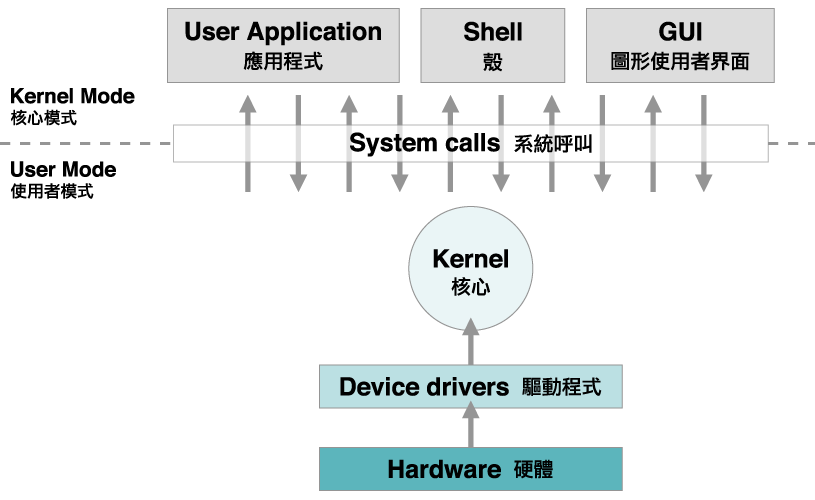
That makes the operating system part of the model-to-hardware path.
The model itself can remain an ONNX model.
The execution layer decides which compatible processor and provider will run it.
This separates the AI workload from some of the hardware plumbing beneath it.
For developers, the same model can participate in a Windows execution stack that understands CPU, GPU and NPU options.
For the operating system, AI inference becomes another workload that can be mapped onto the hardware available in the machine.
Foundry Local Adds Model Selection Above the Hardware Layer
Foundry Local adds another level to the Windows stack.
Instead of requiring the application to package one specific local model implementation, the runtime can expose models through aliases and a local API.
Microsoft says Foundry Local detects available hardware and can serve a hardware-optimized model variant for the device.
Its current Windows documentation describes support across Qualcomm NPU paths, DirectX 12 GPUs, NVIDIA CUDA and CPU execution depending on the model and hardware configuration.
The application can therefore ask for a model by the interface provided by the runtime while Foundry Local handles more of the relationship between the model package and the machine.
This is another form of routing.
At one layer, the app chooses a local model family.
At another layer, the runtime selects the hardware-compatible execution path.
The application can then keep the same higher-level code across several hardware configurations.
That is the kind of abstraction operating systems are designed to provide.
Apple Is Building a Common Model Interface Into Its Developer Stack
Apple is approaching the same architectural idea through the Foundation Models framework.
At WWDC26, Apple expanded the framework so applications can work with multiple language-model sources through a common LanguageModel protocol.
Apple’s developer documentation says that can include the on-device Apple Foundation Model, the Apple model running through Private Cloud Compute and other providers such as Claude or Gemini when they conform through the framework.
The important part is the shared interface.
The application can build around a language-model abstraction rather than designing every feature around one provider-specific call shape.
Apple also added Dynamic Profiles that can swap models, tools and instructions during a continuous session.
That moves model choice closer to runtime application behavior.
One task can use one model configuration.
Another task can use another.
The surrounding application can keep the same framework structure.
The model becomes replaceable inside a larger session architecture.
Private Cloud Compute Extends the Same Apple Session Beyond the Device
Apple’s on-device and server-side models show how one application framework can span two compute locations.
The SystemLanguageModel runs on the device.
PrivateCloudComputeLanguageModel runs through Apple’s Private Cloud Compute infrastructure.
Apple documents both through the Foundation Models framework and the LanguageModel protocol.
Its current documentation lists a 4K context size for the on-device model and a 32K context size for the Private Cloud Compute model, with additional reasoning capability on the server-side option.
The application can create a LanguageModelSession with either model type while retaining the same broader session API, tools and instructions.
That is a direct example of model routing at the application-framework level.
The developer decides which execution target fits the feature.
The framework keeps the interaction model consistent.
The location of the model can change without requiring the entire application architecture to change with it.
The model endpoint becomes one parameter inside the session.
Core AI Adds a Bring-Your-Own-Model Path on Apple Silicon
Apple is also adding a lower-level path for developers who want to run their own models locally.
At WWDC26, Apple introduced Core AI as a framework built into the operating system for running AI models on Apple Silicon.
Apple describes Core AI as a way to load, specialize and run models on-device through a native Swift API.
That gives the platform two different model layers.
Foundation Models provides access to Apple models and provider abstractions for language-model sessions.
Core AI provides a path for custom on-device models.
The combination is similar to what is happening on Windows.
There is a high-level model service for common AI capabilities.
There is also a lower-level runtime for custom models.
Both sit inside the operating-system developer stack.
The app can choose how much of the model management it wants the platform to handle.
Android Uses AICore as a System Service for Gemini Nano
Android places the operating-system layer directly between applications and its on-device foundation model.
Gemini Nano runs through AICore, an Android system service.
Google says AICore manages model distribution, future model updates, safety functions and the use of on-device hardware acceleration.
Applications can access Gemini Nano through ML Kit GenAI APIs instead of independently packaging the foundation model and its runtime.
That changes the deployment model for on-device AI.
The application does not have to treat a large model file as ordinary app content.
The operating system can provide the model as a shared system capability.
The same platform layer can manage updates and connect inference to supported hardware.
Google’s current documentation describes Gemini Nano as running through AICore for tasks including summarization, rewriting, image description, speech recognition and custom prompting through ML Kit interfaces.
Android is therefore turning the foundation model into an operating-system service that applications can call.
Android Can Combine On-Device and Cloud Models in One Agent System
Android’s agent framework extends the model-selection idea beyond one model at a time.
Google’s Agent Development Kit for Android supports on-device Gemini Nano through ML Kit and cloud Gemini models through cloud integrations.
Its documentation also describes a hybrid multi-agent pattern where a cloud model can act as the root orchestrator while on-device Gemini Nano sub-agents handle selected tasks locally.
That is a different kind of routing.
The decision can happen at the agent level.
One part of the system can use cloud compute.
Another part can run on the phone.
The application can organize those models as cooperating agents inside one workflow.
This matters because future AI applications may not have one universal model call.
They may contain several model roles.
The operating system and its AI frameworks provide the runtime environment in which those roles can be assigned.
The Router Is Also Becoming a Model-Management Layer
Routing is not only about choosing local or cloud.
It is also about managing the model once it becomes part of the device.
Android AICore manages Gemini Nano distribution and updates.
Windows can manage shared ONNX Runtime components and dynamically acquired execution providers through Windows ML.
Foundry Local can manage model catalogs and hardware-optimized variants.
Apple provides system models directly through Foundation Models and adds Core AI for custom on-device execution.
These are different implementations, but they move the same category of work upward into the platform.
The application can depend on an operating-system AI service instead of independently rebuilding distribution, runtime selection, hardware mapping and update logic for every feature.
That gives AI a more conventional place inside software architecture.
The model starts to look less like a separate product bolted onto an app.
It starts to look like a compute resource exposed through the platform.
Applications Can Start Choosing Models by Task Instead of by Brand
A common model interface changes how developers can think about application design.
The first question can become: what does this task need?
A short offline summarization feature may fit an on-device model.
A long document workflow may use a server model with a larger context window.
A specialized vision feature may use a custom local model.
A background classification task may run through a built-in AI API.
A multi-agent workflow may divide work between local and cloud models.
Windows, Apple platforms and Android now all expose pieces of that architecture.
The details remain platform-specific, and the developer still defines the product logic.
But model identity is becoming easier to separate from feature identity.
The feature can be designed around a capability.
The runtime can then connect that capability to the model and compute path selected for the task.
That is the practical meaning of the operating system becoming a model router.
The Operating System Is Becoming Part of the AI Runtime
The operating system has always decided how applications reach hardware and shared system services.
AI is becoming another part of that responsibility.
Windows can expose built-in models, local open models, custom ONNX models, execution providers and cloud paths inside one developer platform.
Apple can expose an on-device foundation model, a Private Cloud Compute model, third-party language-model providers and custom Core AI models through its developer stack.
Android can expose Gemini Nano through AICore, custom local models through its AI toolchain and cloud models through hybrid application architectures.
The common idea is not that one operating system automatically chooses every model for every application.
The common idea is that model access, execution and hardware mapping are moving into platform APIs that applications can build around.
That is what turns the operating system into an AI model router.
The application defines the task.
The platform provides more ways to connect that task to the model and compute path that will run it.
That is the upgrade.
AI Is Moving From One Location to Several
For a long time, most consumer AI had one obvious home.
The model ran in a data center. The phone or laptop sent a request. The server produced the result. The device displayed it.
That architecture is still important, but it is no longer the only one.
Modern laptops, phones and tablets now include CPUs, GPUs and NPUs capable of running useful AI models directly on the device. At the same time, cloud infrastructure continues to scale into larger models, longer context windows and more demanding multimodal workloads.
The result is a split computing stack.
Some AI can stay close to the user. Some AI can run remotely. The application can decide which execution path fits the job.
Microsoft reflects this directly in its Windows AI guidance, which includes local APIs, Foundry Local, Windows ML and cloud services as parts of the same broader development environment. Apple is moving in the same direction through its Foundation Models framework, on-device system models and Private Cloud Compute.
That changes the question.
Local AI and cloud AI are no longer two competing ideas.
They are becoming two places where the same product can think.
Local AI Brings the Model Closer to the User
Local AI begins with proximity.
The model is running on the same device as the file, camera, microphone, application or user interaction it is working with.
That can make certain AI features feel immediate.
OCR can read text from a local image. A search tool can index files on the machine. A camera feature can process a live feed. A writing tool can summarize or transform text. A small assistant can answer from information already available on the device.
Microsoft’s Windows AI APIs are designed around this kind of execution on supported hardware. The platform exposes local capabilities such as OCR, image description, summarization and access to local models. Apple’s Foundation Models framework likewise gives developers access to an on-device model for tasks such as summarization, entity extraction, refinement and structured generation.
The common idea is simple.
The AI feature can use the machine itself as part of the inference infrastructure.
The laptop is no longer only a window into AI.
It can be one of the places where the AI actually runs.
Low-Latency Tasks Fit Naturally on the Device
Some AI interactions happen often enough that speed becomes part of the product experience.
A camera effect is active continuously. A search box may respond dozens of times in one session. OCR may run whenever a document appears. A text tool may make small changes repeatedly while the user is writing.
Local execution gives these tasks a short path.
The application can send the input directly to the local model without waiting for a remote request to travel across the network first.
That is why many on-device AI features are small, frequent and interactive.
Microsoft has been building Windows AI around this pattern on supported PCs. Apple uses the same direction with on-device Foundation Models. The model can sit close to the application and respond as part of the normal interface.
This changes how AI can be designed.
Instead of saving AI for a large command, developers can use it inside smaller moments throughout the application.
The model becomes part of typing, searching, viewing, organizing and navigating.
That is one of the most important effects of local AI: it makes AI easier to weave into the software itself.
Local Processing Creates a Strong Privacy Architecture
Local AI also creates a useful privacy model for supported workflows.
When inference happens entirely on the device, the input can remain on the machine for that part of the process.
Microsoft states that supported Windows AI APIs process data locally, and its Foundry Local documentation describes inference paths where inputs and outputs stay on the device. Apple’s on-device Foundation Models are designed around the same principle: supported generative work can happen on the user’s hardware.
That creates new possibilities for applications working with personal content.
A document assistant can process local notes. A photo tool can understand images already stored on the device. A search feature can index local files. A writing tool can work with text before any cloud request becomes part of the experience.
This architecture is useful because it gives developers another way to design privacy-conscious products.
The application can decide that some steps belong on the device by default.
Then larger cloud services can be added around those local capabilities when the product wants additional scale.
Privacy becomes part of system design, not only a policy written after the product is built.
Offline AI Makes the Device More Independent
A local model can also continue working when the network is not part of the moment.
That makes offline AI useful in travel, field work, aircraft, remote locations and any workflow where connectivity changes throughout the day.
Microsoft describes Foundry Local as supporting local inference after the required model is available on the machine. Apple likewise exposes on-device Foundation Models for supported generative tasks.
The practical effect is easy to understand.
The user can open the application and keep using the supported AI feature even when the device is disconnected.
A local summarizer can work with a document. A classification model can organize content. OCR can continue reading text. A local assistant can keep working with information stored on the machine.
That is a meaningful change in how AI software behaves.
The application does not have to treat an internet connection as the beginning of every intelligent action.
Instead, the device can carry some of its own intelligence with it.
That makes AI feel more like a built-in computing capability and less like a remote service the machine has to reach before anything useful can happen.
Cloud AI Gives Applications Access to a Much Larger Compute Pool
Cloud AI has a different strength: scale.
A server platform can combine large accelerator fleets, high-capacity memory, fast networking and centralized model infrastructure. That gives applications access to models and workloads far beyond what a portable battery-powered device is designed to carry locally.
This becomes useful for long context, complex reasoning, large multimodal inputs, agentic workflows and other tasks that benefit from a larger compute envelope.
Microsoft’s local-versus-cloud guidance treats model size and complexity as major architectural inputs. Apple does the same in its Foundation Models work, pairing on-device models with Private Cloud Compute for workloads that can use larger server-side capability.
The cloud therefore expands the ceiling of the application.
The device can remain thin and portable while the product reaches infrastructure that may contain far more memory and compute than any laptop or phone.
This is why cloud AI remains central even as local AI improves.
The local device adds immediacy and proximity.
The cloud adds scale.
Longer Context Windows Create a Different Kind of AI Experience
One of the easiest ways to see the difference between device-scale and server-scale AI is context.
Context determines how much information a model can work with inside one interaction.
Apple’s WWDC26 developer material provides a concrete example inside its own stack. Apple describes an on-device system model with roughly a 4K context window and a Private Cloud Compute model with roughly 32K context in that specific framework.
Those figures are Apple-specific, but the architecture is useful to understand.
The on-device model is designed to be available locally. The server model can draw on a larger resource envelope and work with substantially more context.
That difference changes the kinds of experiences an application can create.
A local model can handle short transformations, extraction and immediate assistance. A larger cloud model can take in longer documents, larger conversations or more complex multimodal material.
The product does not have to choose one forever.
It can use the smaller local model for frequent everyday interactions, then move a larger request to the cloud when the task expands.
That is where the two execution paths begin to look complementary rather than separate.
Centralized Cloud Models Can Evolve Across an Entire Service
Cloud AI also gives providers a powerful deployment model.
The model lives in centralized infrastructure.
When the provider updates that model, expands the serving stack or adds new capabilities, the change can become available across the service without moving the full model weights onto every user’s device.
That creates a fast path for platform evolution.
A cloud service can scale capacity, introduce a newer model family, extend context, add tools or improve multimodal processing from the server side.
Developers can then expose those capabilities through the same application interface.
This is one reason cloud AI is especially useful for products that serve many users and need access to large shared infrastructure.
The application can remain relatively lightweight while the provider manages the deeper compute environment centrally.
Local AI and cloud AI therefore distribute responsibility differently.
The local path places more intelligence directly inside the device.
The cloud path places more intelligence inside the service.
Modern applications can use both.
Private Cloud Compute Shows That Cloud AI Can Have a Purpose-Built Privacy Architecture
Cloud AI does not have to mean one generic server model.
Apple’s Private Cloud Compute shows how a provider can build a remote AI architecture around specific privacy and security requirements.
Apple documents PCC as infrastructure designed so user data sent for a request is used for the computation and is not retained after the response, with additional verification and security mechanisms around the system.
That makes PCC an important example because it widens the architecture choices available to developers and platform designers.
An application can keep supported work fully on-device. It can use a purpose-built private cloud architecture for larger requests. It can also connect to other server models where the product design calls for them.
The important shift is choice.
Privacy-sensitive design is not limited to one execution location.
It can influence how the local path is built and how the remote path is built.
That gives modern AI systems more flexibility than the old binary of ‘device equals private’ and ‘cloud equals remote.’
The architecture itself can carry the privacy model.
Hybrid AI Lets the Application Route Work to the Right Place
The most interesting architecture is often the one that uses both locations.
A hybrid AI application can keep lightweight work on the device and send larger work to server infrastructure when the task expands.
The local side might handle OCR, indexing, classification, short summarization, image understanding or quick text generation. The cloud side might handle longer context, deeper reasoning, larger multimodal inputs or an agentic workflow that needs more compute.
Apple is moving directly toward this model through its Foundation Models framework and Private Cloud Compute. Microsoft is doing the same across Windows AI, Foundry Local, Windows ML and cloud services.
This creates a routing layer inside the product.
The user asks for one thing.
The application decides where each part should run.
Some work can happen immediately on the device. More demanding work can move to the server. The result comes back into the same interface.
That is a major architectural change.
AI products are beginning to manage compute location the way modern systems already manage storage, networking and graphics resources.
The location becomes part of the software design.
AI PCs Make Local Execution a Larger Product Category
Local AI is becoming more important because consumer hardware is changing underneath it.
AI PCs increasingly include NPUs designed for neural-network workloads. CPUs and GPUs continue to improve. Memory capacity is rising. Operating systems are exposing local AI APIs. Model developers are creating smaller models designed to run efficiently on endpoint hardware.
Those changes reinforce one another.
Better hardware makes more local AI possible.
More local AI gives developers a reason to target the hardware.
More software gives users a reason to care about the NPU, GPU and local model stack inside the machine.
Microsoft’s Windows AI work is part of that cycle. Apple’s Foundation Models are another example on its platforms.
The device is becoming an AI execution target in its own right.
That does not shrink the role of cloud AI.
It expands the total AI system.
Instead of one remote model doing everything, the product gains another compute layer close to the user.
The Future AI Stack Is Local, Cloud and Everything Between Them
The long-term shift is not difficult to see.
AI is becoming distributed.
The phone can run a model. The laptop can run a model. The operating system can expose local AI services. The cloud can run larger models. Private server architectures can handle sensitive remote workloads. Applications can route between those places as the task changes.
That gives developers more ways to design the experience.
Fast, repetitive and personal interactions can stay close to the device. Offline features can remain available while the network disappears. Larger reasoning tasks can use server-scale compute. Long context can move to infrastructure with more memory. The same application can combine all of those paths without turning them into separate products.
Microsoft and Apple are already building software frameworks around this model.
That is the important signal.
Local AI is no longer a small alternative to cloud AI.
Cloud AI is no longer the only place where intelligence lives.
They are becoming layers of the same computing stack.
The device thinks.
The cloud thinks.
The application decides how to connect them.
That is the upgrade.
The Laptop Has Gained a Third Compute Engine
For years, the laptop was easy to explain.
The CPU handled general computing. The GPU handled graphics and highly parallel work.
Now a third processor is becoming normal.
The NPU, or Neural Processing Unit, is designed specifically for the mathematical operations used by machine-learning models. That gives the laptop a dedicated place to run supported AI workloads.
Intel describes modern AI PCs as systems where the CPU, GPU and NPU work together. The CPU remains the general-purpose engine. The GPU provides large amounts of parallel compute for graphics and demanding AI workloads. The NPU is designed for efficient, sustained neural-network processing.
That changes the architecture of the laptop.
AI no longer has to appear only as an application that calls a remote service or as a workload pushed entirely onto the CPU or GPU. The operating system and applications can choose a dedicated local accelerator when the workload fits it.
This is the first important change.
The NPU gives AI its own place inside the machine.
On-Device AI Becomes Part of the Normal PC Architecture
Once the NPU exists, more AI work can happen directly on the laptop.
Microsoft is building Windows AI around that idea. Copilot+ PCs use a new hardware baseline that includes a high-performance NPU, and Windows exposes AI capabilities that developers can connect to through its software stack.
The practical result is simple.
A supported feature can send inference to the local NPU instead of treating AI as something that always lives somewhere else.
That can apply to transcription, image understanding, text processing, camera effects, audio processing, local assistants and other model-driven features.
The benefit is architectural.
The application can use the machine sitting in front of the user as part of the AI system. The laptop’s own processors become part of the product experience.
This also creates more room for hybrid designs.
A feature can use local processing for the parts that fit naturally on the device, then connect to larger cloud systems when a workflow needs broader compute or services.
The NPU therefore expands the number of places where AI can run.
That is a major shift from treating the laptop only as the screen and keyboard connected to an AI service.
Windows Studio Effects Shows the NPU Working in the Background
Windows Studio Effects is one of the clearest examples because the AI is present during an ordinary activity.
A user joins a video call.
The system can apply supported effects such as background blur, automatic framing, eye contact and voice focus. Microsoft documents these effects as NPU-accelerated capabilities on compatible systems.
The interesting part is where the work happens.
The NPU can keep processing the camera or audio stream while the CPU continues running the application and the GPU remains available for graphics and other parallel workloads.
That is exactly the kind of job the NPU is built for.
It is continuous. It uses a neural model. It can remain active while the user does something else.
Once that pattern exists, it can extend far beyond video calls.
A transcription feature can listen while the user works. A local image tool can analyze content. A writing application can use local language features. An accessibility feature can interpret visual or audio input. An assistant can keep a small model ready for frequent tasks.
The NPU makes AI easier to treat as a background capability of the computer rather than a separate event.
Efficiency Is What Makes Persistent AI Practical
Laptop AI becomes much more interesting when it can stay active for long periods.
That is where the NPU design matters.
Intel positions the NPU as the efficient engine for sustained AI workloads. Microsoft uses NPU acceleration for features such as Windows Studio Effects for the same reason: specialized hardware can handle supported neural-network operations while the rest of the system continues with its own work.
Think about the difference between a short AI request and a feature that remains active for an hour.
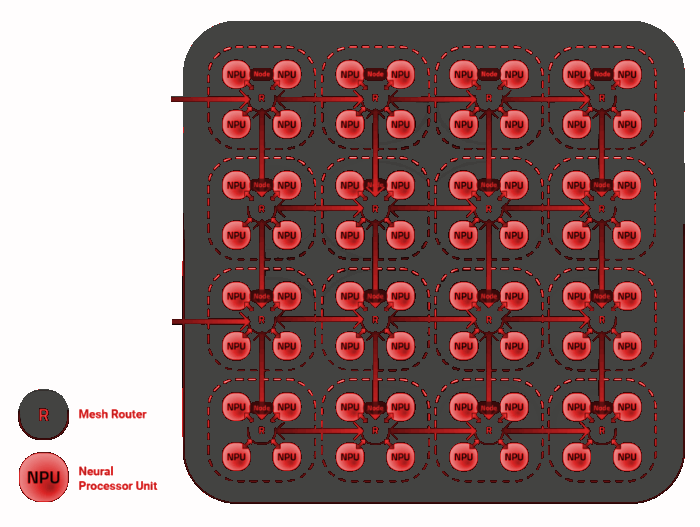
Noise processing during a meeting is continuous. Automatic framing is continuous. Live transcription can be continuous. A local assistant may remain ready throughout the session.
These are different from asking a model one question and closing it.
They turn AI into a persistent layer of the laptop experience.
A dedicated processor makes that model easier to build around because the operating system has another compute resource available specifically for this class of workload.
The result is a better division of labor inside the machine.
The CPU can stay focused on general application logic. The GPU can keep its high-throughput role. The NPU can carry supported neural workloads that benefit from efficient local execution.
40+ TOPS Has Become a New Windows Hardware Threshold
TOPS has become one of the main numbers attached to AI laptops.
It means trillions of operations per second, and Microsoft uses NPU performance above 40 TOPS as a core hardware requirement for Copilot+ PCs.
That gives the number an important role.
It creates a common hardware level that Windows can build around when delivering NPU-focused experiences. Instead of every application treating every laptop as a completely different AI machine, developers can target a growing class of PCs designed around a defined NPU capability.
Intel, AMD and Qualcomm now all offer mobile processor families built for this AI-PC era.
That matters because software ecosystems grow when developers know the hardware will exist in large numbers.
A single accelerator inside one unusual laptop is an experiment.
A hardware class adopted across several major processor vendors becomes a platform.
The 40+ TOPS threshold is therefore more than a specification printed on a box.
It is part of the foundation Microsoft is using to define the Copilot+ PC generation and part of the reason software developers can begin designing more confidently around local NPU compute.
The CPU, GPU and NPU Create a Heterogeneous AI System
The most useful way to understand an AI laptop is to stop asking which processor wins.
The architecture is built around cooperation.
The CPU is excellent at general-purpose logic, operating-system work and responsive application tasks. The GPU is designed for graphics and large parallel workloads. The NPU adds a processor optimized for neural-network inference and efficient sustained AI work.
Intel describes this as heterogeneous compute: the system has several engines and software can place work on the engine that fits the task.
That creates more options for developers.
A large creative AI workload can use the GPU. Application logic can remain on the CPU. A background model for voice, vision or text can run on the NPU. A single application can use more than one processor across different parts of the same workflow.
This is important because AI software is becoming more varied.
Some models are small and always available. Some are large and bursty. Some process a live audio stream. Some generate an image. Some analyze local documents. Some connect local inference with cloud services.
Three compute engines give the laptop more ways to match hardware to that variety.
The NPU is valuable because it adds another specialized lane to the system.
Windows AI Gives Developers a Path to the NPU
Hardware becomes useful when software can reach it.
Microsoft is building that path into Windows.
Windows AI, Windows ML and related frameworks give developers ways to build applications that use local AI hardware. ONNX Runtime and vendor toolchains add more options around model execution and optimization.
That changes the role of the NPU from a processor specification into a development target.
A software company can design a feature, choose a suitable model and connect that model to the local AI resources available on the PC.
As the installed base of NPU-equipped laptops grows, the incentive to build these features grows with it.
This is the same pattern seen with other hardware accelerators.
First the silicon appears. Then operating systems expose it. Then frameworks make it easier to use. Then applications begin treating the capability as part of the normal platform.
The AI-PC market is moving through that sequence now.
Microsoft provides the Windows layer. Intel, AMD and Qualcomm provide major processor platforms. Application developers can build on top of both.
The NPU becomes more important as that software path becomes more common.
Local AI Gives Laptop Apps New Kinds of Features
Once local AI compute is available, applications can be designed differently.
A photo application can use local models for image analysis or enhancement. A meeting tool can add voice processing and transcription. A writing tool can use language models for local text operations. A search feature can understand meaning instead of relying only on exact keywords. A camera application can apply intelligent framing continuously.
The important change is proximity.
The model is running on the same machine as the file, camera, microphone or application state it is working with.
That makes on-device AI a natural fit for features that are closely tied to the user’s immediate environment.
It also gives developers another way to design privacy-conscious workflows because supported processing can happen locally when that architecture fits the feature.
The laptop becomes more than a client for remote AI.
It becomes one of the places where the AI itself can execute.
That is why NPU adoption matters beyond one Windows feature or one benchmark.
It expands the design space for every application that can make useful work out of local neural-network compute.
The NPU Is Becoming Part of the Laptop Buying Baseline
The NPU is moving from a specialist feature into the normal architecture of major laptop platforms.
Microsoft has defined Copilot+ PCs around a 40+ TOPS NPU class. Intel is building NPUs into its Core Ultra platforms. AMD is expanding Ryzen AI across mobile processors. Qualcomm is positioning Snapdragon laptops around on-device AI as a central capability.
That tells us where the market is going.
A modern laptop is increasingly expected to have three important compute resources: CPU, GPU and NPU.
The CPU still matters. The GPU still matters. Memory, storage, display, battery, ports and the rest of the machine still define the overall computer. The NPU adds a new capability alongside them: dedicated local AI compute.
For a buyer planning to keep a laptop for several years, that gives the machine more room to participate in the software direction Windows and major chip companies are already building toward.
The most interesting part may come later.
Today, Windows Studio Effects and Copilot+ features make the NPU visible. Tomorrow, more applications can treat the accelerator as a normal part of the PC.
The hardware is already arriving.
The software ecosystem is growing around it.
The laptop has gained a dedicated AI engine.
That is the upgrade.