RugOne’s Xsnap 7 Pro takes the phone-camera idea in a different direction: one rear camera module detaches from the rugged handset and keeps recording as a standalone action camera. The detachable unit can shoot up to 2.7K at 30 fps through a 133-degree ultrawide lens, run for about 40 minutes on its own, and reconnect to the phone for control, viewing, charging and file transfer. The phone itself combines a Dimensity 8400 platform, 12 GB of RAM, 512 GB of storage, a 6.67-inch 120 Hz AMOLED display and a 9,300 mAh battery. The interesting part is not simply that RugOne added another camera. It separated image capture from the phone body while keeping the phone as the screen, battery hub and control layer — a modular imaging idea that could matter beyond rugged phones if it proves useful in real-world shooting.
The Camera Is No Longer Trapped Inside the Phone
Smartphone cameras have improved for years by adding more sensors, larger sensors, better lenses and more computational photography.
RugOne is trying something different.
On the Xsnap 7 Pro, one rear camera module can physically leave the phone.
The user can detach the small magnetic camera, mount it away from the handset and keep recording while the phone becomes the viewfinder, controller, battery dock and storage hub.
That sounds like a novelty.
It is actually a different architecture for mobile imaging.
The phone is no longer only the object doing the recording.
It becomes the control center for a second camera that can move independently.
RugOne Is Launching the Xsnap 7 Pro at IFA 2026
RugOne is formally introducing the Xsnap 7 Pro during IFA 2026 in Berlin.
The official IFA program lists the company’s September 5 product event and describes the Xsnap 7 Pro as an outdoor smartphone with a detachable action camera.
RugOne had already shown the concept earlier in 2026, including at Mobile World Congress.
IFA is where the company is moving the product from an unusual prototype-style idea toward commercial launch.
The timing matters because RugOne is not only showing a design experiment.
The company says a Kickstarter campaign is planned for September 7, followed by broader availability later in the year.
The Detachable Camera Is the Product
The rest of the phone has solid specifications.
But the camera module is the reason the Xsnap 7 Pro exists.
The module is small enough to remove from the rear of the handset and use independently.
RugOne describes it as thumb-sized.
Recent hands-on reporting lists the module at roughly 39 grams.
That low weight matters.
A phone is too heavy for many point-of-view mounting positions.
A small camera can sit on clothing, a helmet, a bike, a vehicle or a narrow surface while the phone stays somewhere safer.
The Module Records Up to 2.7K at 30 Frames per Second
The removable camera is not trying to replace the highest-end action cameras on raw video specifications.
It records up to 2.7K at 30 frames per second.
That is lower than the 4K and higher-frame-rate modes available on many dedicated action cameras.
The trade-off is integration.
The camera is already part of the phone.
It docks to the handset.
It uses the phone as a control surface.
It can be recharged from the phone.
The appeal is less about beating GoPro or Insta360 on image quality and more about carrying one device instead of two.
The Lens Is a 133-Degree Ultrawide
The detachable camera uses a 133-degree ultrawide field of view.
That is appropriate for action-camera use because the user often cannot frame the shot precisely while moving.
A wider lens captures more of the scene and gives more margin for body movement, cycling, walking or other motion.
RugOne also describes distortion correction designed to reduce the exaggerated stretching that ultrawide lenses can produce near the edges of the frame.
Software stabilization is part of the system as well.
The company is therefore treating the detachable unit as a real action-camera module rather than simply moving an ordinary phone camera into a smaller box.
Forty Minutes of Standalone Recording Is the First Constraint
A tiny detachable camera has a tiny battery.
Recent reporting says the module can record for roughly 40 minutes on one charge.
That is enough for short activities, clips and point-of-view sequences.
It is not enough for an all-day recording session by itself.
This is where the phone becomes part of the camera system.
The camera can return to the handset to recharge.
RugOne is effectively using the much larger phone battery as the energy reserve for the smaller detachable camera.
The Phone’s 9,300 mAh Battery Becomes the Camera Dock
The Xsnap 7 Pro carries a 9,300 mAh battery.
That is much larger than the battery found in most mainstream flagship phones.
RugOne positions that capacity around outdoor use and the detachable-camera workflow.
A large phone battery can power the handset, recharge the action module and support long periods away from a wall charger.
The Verge reports that repeated docking can extend total camera use dramatically compared with the module’s single-charge runtime.
That does not mean the camera records continuously for that entire period.
It means the phone can repeatedly replenish the smaller module.
This Is More Like Earbuds and Their Charging Case
The architecture is easier to understand if we stop thinking about a normal phone camera.
Wireless earbuds have small batteries because the charging case carries the larger reserve.
The Xsnap 7 Pro applies a similar relationship to imaging.
The removable camera is small and light because the phone carries the larger screen, battery and storage capacity.
The module leaves the phone when physical freedom matters.
It returns when it needs power, management or a larger interface.
That separation is what makes the design interesting.
The Phone Can Act as a Wireless Viewfinder
Once the camera is detached, the handset can still act as a remote display and controller.
Recent coverage reports a wireless viewing/control range of roughly 50 meters under appropriate conditions.
That changes how the user can frame a shot.
The camera can be placed somewhere the user cannot comfortably hold a phone.
The phone can remain in the user’s hand.
The user can then preview the image and control recording remotely.
This is a workflow dedicated action cameras already support through phone apps.
RugOne is integrating that relationship into one device package from the start.
The Camera Carries Its Own Storage
The detachable unit includes its own local storage.
The Verge reports 64 GB inside the camera module.
That is important because the camera cannot depend on a constant high-bandwidth wireless connection to the phone while recording.
The module can capture footage locally and transfer files later.
RugOne’s design therefore gives the detached camera enough independence to behave like a real recording device rather than a wireless lens that becomes useless when the connection weakens.
Then the Phone Adds Another 512 GB
The handset itself includes 512 GB of internal storage.
That gives the two-part system a useful hierarchy.
Record on the detachable camera.
Move footage to the phone.
Review it on the larger display.
Edit or share from the handset.
Clear space on the camera.
Go back out and record again.
This is where modularity starts to become practical rather than decorative.
The phone is not only carrying the camera.
It is the media-management device behind the camera.
The Action Camera Is More Waterproof Than the Phone
One of the stranger details is that the detachable camera can tolerate deeper water than the phone itself.
Recent reporting says the camera module can be submerged to about 5 meters without an additional case.
The Xsnap 7 Pro phone carries IP68 and IP69K protection and is described as surviving immersion to around 2 meters for up to 30 minutes.
Those are different claims and should not be mixed.
The practical benefit is obvious.
The small camera can go into situations where taking the entire handset would be inconvenient or risky.
IP68 and IP69K Are Part of the Phone’s Core Identity
The Xsnap 7 Pro is still a rugged phone.
IP68 relates to dust protection and water immersion under specified test conditions.
IP69K is associated with resistance to high-pressure, high-temperature water jets under a defined test method.
Neither rating means the phone is indestructible.
Neither guarantees survival in every real-world water environment.
But the ratings reinforce RugOne’s target market.
The detachable camera is being built into a phone designed around outdoor use rather than into an ordinary glass flagship.
The Phone Is Built Around MediaTek Dimensity 8400
RugOne uses MediaTek’s Dimensity 8400 platform for the Xsnap 7 Pro.
That places the device well above entry-level rugged phones in compute capability.
The phone is paired with 12 GB of RAM and 512 GB of storage.
Those resources matter for camera workflows.
High-resolution media processing, stabilization, preview, file transfer and editing all put pressure on the system.
RugOne is trying to make the phone credible as both a rugged device and a media platform.
The Display Is a 6.67-Inch 120 Hz AMOLED
The Xsnap 7 Pro uses a 6.67-inch 1.5K AMOLED display with a 120 Hz refresh rate.
Recent coverage also lists high peak brightness intended to improve outdoor visibility.
That screen plays two roles.
It is the phone display.
It is also the control monitor for the detachable camera.
A modular camera becomes far more useful when the main device provides a large, responsive preview screen.
Instead of putting an expensive large display on the tiny camera, RugOne leaves the expensive interface on the phone.
The Main Rear Camera Is Still 50 Megapixels With OIS
Detaching the action camera does not leave the phone without normal photography hardware.
RugOne lists a 50 MP stabilized main camera on the handset.
That is the camera for ordinary phone photography.
The detachable module is a separate tool.
This distinction matters because the Xsnap 7 Pro is not trying to force one camera to perform every imaging task.
The phone keeps a conventional main camera for everyday photos.
The removable unit handles the shots where physical placement matters more.
There Is Also a 64 MP Infrared Night-Vision Camera
The phone also includes a 64 MP infrared night-vision camera with dedicated infrared illumination.
Night-vision cameras are already common in some rugged-phone categories because the products target outdoor and field use.
The sensor does not turn ordinary darkness into daylight in the same way a large professional low-light camera might.
It uses infrared illumination and an infrared-sensitive imaging path to capture scenes that may be difficult to see normally.
That adds another specialized camera to a phone already centered on unusual imaging modes.
The Front Camera Is 32 Megapixels
The Xsnap 7 Pro also includes a 32 MP front camera.
On another phone, that specification might be part of the headline.
Here it is almost background information.
That says something about the product.
RugOne is not marketing the phone primarily around a conventional three-camera flagship hierarchy.
The product identity comes from modular capture.
The detachable action camera changes what the camera system can physically do, not simply how many megapixels are available.
The Phone and Camera Solve Different Physical Problems
A smartphone is excellent when the user can hold it.
An action camera is excellent when the user cannot.
That difference is physical, not computational.
No amount of AI can make a 300-gram phone feel like a tiny wearable camera.
No software stabilization can make a full phone convenient on a helmet or chest mount.
RugOne’s design accepts that limitation.
Instead of asking software to compensate for the phone’s physical size, the system allows part of the camera hardware to leave the phone.
Modular Phones Usually Failed Because the Modules Were Extra
The phone industry has tried modularity before.
Many attempts required users to buy separate add-ons.
A camera grip.
A projector.
A speaker.
A second module that lived in a drawer until the right moment.
That creates friction.
The Xsnap approach is different because the module is part of the phone itself.
The user is already carrying it.
The camera has a default storage location on the handset.
The modular capability is available without remembering to pack another device.
That could make the idea more practical than earlier accessory-based modular-phone concepts.
The Risk Is That Two Devices Can Mean Two Failure Points
Modularity creates advantages.
It also creates complexity.
The magnetic attachment has to remain secure.
The module has its own battery.
Its own storage.
Its own wireless connection.
Its own charging behavior.
Its own software.
A conventional camera fixed inside the phone has fewer moving parts in the user experience.
RugOne now has to make detaching, reconnecting, syncing and transferring footage reliable enough that the extra flexibility feels worth the extra complexity.
Wireless Preview Is Not the Same as a Wired Camera Connection
A remote camera introduces latency and connection limits.
A 50-meter range is not a guarantee in every environment.
Walls, interference, terrain and nearby radios can reduce wireless performance.
The module’s local storage helps because recording does not have to stop when preview quality changes.
But users should still think of the phone connection as a control and preview link, not as a magical cable replacement with unlimited reliability.
Real-world reviews will matter here.
2.7K Is a Deliberate Compromise
A detachable camera this small has constraints.
Sensor size.
Thermals.
Battery.
Processing.
Storage.
RugOne caps the highlighted video mode at 2.7K/30 fps.
That may disappoint users comparing specification tables with premium action cameras.
The product should be judged by a different question.
Is the footage good enough that having the camera with you all the time is more valuable than carrying a separate higher-end action camera?
If the answer is yes for enough users, the lower ceiling may be acceptable.
The Phone Is Trying to Replace a Two-Device Kit
The normal outdoor-content kit can include a phone and a small action camera.
That means two devices.
Two charging systems.
Two sets of files.
Two pieces of hardware to remember.
The Xsnap 7 Pro tries to collapse that kit.
The phone provides the large battery, screen, connectivity and editing environment.
The detached module provides physical freedom.
The success of the idea will depend on whether that integration saves enough effort to compensate for the compromises of the smaller camera.
The Kickstarter Launch Adds Another Layer of Risk
RugOne plans to launch the Xsnap 7 Pro through Kickstarter on September 7.
That matters.
Crowdfunding is not the same thing as ordinary retail availability.
Production schedules can change.
Shipping dates can move.
Features can change between preproduction and final hardware.
Potential buyers should separate the product concept from the certainty of delivery timing.
RugOne is an established device brand under Ulefone’s broader ecosystem, but a Kickstarter launch still deserves the same caution applied to any crowdfunded hardware campaign.
The Early Price Is Expected Around €799
Recent reporting says the Kickstarter campaign will start with a limited early price around €799.
A later global retail release is expected around $999.
Those figures should be treated as announced launch pricing, not as permanent street prices.
Regional taxes, availability and retail channels can change the final cost.
The important competitive point is that RugOne is pricing the Xsnap 7 Pro like a premium rugged phone rather than like a cheap novelty device.
At $999, the Camera Has to Be More Than a Gimmick
A four-figure rugged phone has to justify itself.
The detachable camera is not enough if users stop detaching it after the first week.
The module has to be easy to mount.
Fast to connect.
Reliable to record.
Simple to recharge.
Easy to manage.
The phone has to be good even when the modular feature is ignored.
This is the central commercial test.
Interesting hardware can win awards and attention.
Only repeatable utility turns that hardware into a product category.
The Xsnap 7 Pro Already Won an IFA Innovation Award
RugOne says the Xsnap 7 Pro received an IFA 2026 Innovation Award ahead of its official IFA launch event.
That recognition reflects how unusual the form factor is.
It should not be treated as an independent long-term product-quality verdict.
Awards evaluate innovation under a particular process.
They do not tell us how the magnetic connection behaves after months of use, how good the camera looks in difficult lighting or how reliable the wireless workflow becomes outdoors.
Those questions require shipping hardware and sustained testing.
The Broader Idea Is a Camera System With Distributed Parts
Smartphone camera systems are normally centralized.
Sensors and lenses sit in the phone.
Compute sits in the phone.
Storage sits in the phone.
Display sits in the phone.
RugOne separates those layers.
Capture can move away.
Compute, storage, connectivity and the interface can remain on the handset.
That distributed architecture is the real innovation.
The camera becomes a sensor node attached to the phone ecosystem rather than a permanent part of the phone body.
This Could Be More Interesting for Creators Than Another Telephoto Lens
Mainstream smartphone camera competition often focuses on zoom range, portrait processing and sensor size.
Those upgrades improve image quality.
They do not create new camera positions.
A detachable module can.
Helmet view.
Chest view.
Pet-level view.
Bike frame.
Vehicle exterior.
Remote placement.
A strange angle inside a small space.
That flexibility can produce footage a better fixed phone camera simply cannot capture.
For some creators, physical perspective may be more valuable than another incremental increase in image quality.
The Idea Could Spread Beyond Rugged Phones
Rugged phones are a logical place to test this architecture because their users are more likely to care about action capture, outdoor durability and large batteries.
But the design is not inherently limited to rugged devices.
A mainstream phone could carry a smaller detachable camera.
A foldable could use one.
A tablet could control several.
A future device could support multiple remote camera pods.
Whether any of that happens depends on whether RugOne proves that users actually value the separation.
The Xsnap 7 Pro is a useful experiment even if the exact product remains niche.
It Also Raises a Better Question About Phone Modularity
Phone modularity has often been discussed as replacing parts.
Battery modules.
Camera upgrades.
Expansion accessories.
RugOne suggests another form.
Temporarily distribute the device.
The phone does not have to permanently change shape.
One subsystem simply leaves, performs a task and returns.
That is a more dynamic definition of modular hardware.
Instead of swapping the phone into a different configuration, the device briefly becomes two cooperating products.
What RugOne and IFA Have Actually Confirmed
RugOne is presenting the Xsnap 7 Pro at IFA 2026 and describes it as an outdoor rugged smartphone with a detachable magnetic action-camera module.
The official IFA program lists the product as part of RugOne’s September 5 launch event.
RugOne has previously confirmed a 6.67-inch 1.5K 120 Hz AMOLED display, Dimensity 8400 platform, a large battery, a 50 MP OIS main camera and a 64 MP night-vision camera.
Recent launch coverage adds the current production-target details for the detachable camera, including up to 2.7K/30 fps recording, a 133-degree field of view, roughly 40 minutes of standalone recording and independent storage.
The phone is expected to move to Kickstarter on September 7 before broader retail availability.
What We Should Not Claim
We should not say the Xsnap 7 Pro has already shipped globally.
It has not.
We should not describe Kickstarter availability as guaranteed retail delivery.
We should not say the detachable camera replaces high-end action cameras in image quality.
Its highlighted recording ceiling is 2.7K/30 fps.
We should not say IP68 or IP69K makes the phone indestructible.
Those are defined test ratings.
We should not say a wireless viewing range is guaranteed in every environment.
And we should not treat RugOne’s “world first” language as an independently established historical fact beyond the company and IFA’s current product positioning.
The Bigger Upgrade Is Giving the Camera Its Own Body
Phone cameras keep getting better.
But they remain attached to the phone.
RugOne is testing whether the next useful camera upgrade is not another sensor inside the same rectangle.
Maybe it is letting the camera leave.
The Xsnap 7 Pro turns the phone into the screen, battery, controller, storage and communications hub.
The small camera becomes the movable eye.
That division will not make sense for every user.
It does something most phone-camera upgrades cannot do.
It changes where the camera can physically exist.
That is why the Xsnap 7 Pro is more interesting than its specification sheet.
Some Older Android Apps Can Stop Appearing to New Users on Newer Phones Today — Here’s What Actually Changes
A new Android phone does not automatically lose access to every old app.
That is the first thing to get right.
Starting August 31, 2026, Google Play is tightening the target API requirements that determine which existing apps remain visible to new users on newer versions of Android.
If an existing phone or Android Auto app still targets Android 14, API level 34, or lower, Google says it will only remain available to new users on devices running an Android version that is the same as or older than the app’s target API level.
That sounds technical because it is.
But the effect is easy to understand.
An old app can still exist on Google Play and still work on some devices, while a person using a newer Android version may no longer see it as available to install if that person has never downloaded it before.
There is an equally important exception.
If you previously installed the app from Google Play, Google says you are not affected by this availability rule. You can continue to discover, reinstall and use it on Android versions the app itself supports.
So this is not a mass deletion of old apps.
It is a change in who can newly discover and install some of them.
What Changes on August 31, 2026
Google Play now applies two related target API deadlines.
For new Android phone and tablet apps, and for updates submitted to existing apps, the requirement moves to Android 16, API level 36, or higher.
Existing apps have a different availability threshold.
To remain available to new users on devices running Android versions newer than the app’s target, an existing mobile or Android Auto app must target Android 15, API level 35, or higher.
That distinction matters.
A developer who wants to submit a new version of an app now has to target Android 16.
An older app that stays published without an update can still remain on Google Play, but if its target API is too old, distribution to new users on newer Android devices becomes restricted.
Google describes the policy as a way to keep apps closer to recent Android security, privacy, performance and platform behavior expectations.
The store listing itself is not necessarily being erased.
Availability becomes dependent on the relationship between the app’s target API level, the Android version on the device and whether the user has installed that app before.
Target API Is Not the Same as the Android Version an App Can Run On
This is the part that causes most of the confusion.
Every Android app can define more than one platform version boundary.
The minimum SDK tells Android how old a platform can be before the app no longer supports it.

The target SDK tells Android which platform behavior level the app was designed and tested to target.
Those are different jobs.
An app can target an older API level and still technically run on a newer Android version because Android keeps compatibility behavior for older targets.
Google’s Android compatibility documentation is explicit about this: targetSdkVersion by itself does not prevent installation on a newer platform version.
The August 31 change is a Google Play distribution rule layered on top of that compatibility model.
That means an app can be technically capable of running on a newer phone while Google Play still limits its availability to new users because the app targets an older API level.
The operating system and the store policy are related, but they are not the same thing.
An App Can Be Old in One Sense and Current in Another
The phrase “older app” can also be misleading.
The important number here is not simply the date when the app first appeared.
An app released many years ago can still comply if its developer continues updating the target API level.
A much newer-looking app can fall behind if it stops receiving platform updates.
Google Play is checking the app’s declared target API level, not judging it by its icon, design or popularity.
That is why there is no reliable list of affected apps based only on age.
Two apps from the same year can have very different target levels.
One may have been maintained regularly.
The other may still work well for a small group of users but have a target level that has not moved forward.
This article deliberately does not name individual apps as “affected” unless their current Play configuration is verified.
The policy is broad.
The status of any one app can change when its developer updates it or receives an extension.
The Simple Example: An App That Still Targets Android 14
Imagine an existing app that targets Android 14, API level 34.
Under the August 31, 2026 availability rule, that app does not meet the new Android phone and tablet threshold of API level 35.
For a new user, Google says the app will only be available on devices running an Android OS version that is the same as or lower than the app’s target API level.
So a new user on Android 14 may still be able to find it.
A new user on an Android version above that target can lose access to the app through Google Play.
The exact boundary follows the app’s target level.
That is more precise than saying “old apps disappear from Android 16.”
Some apps target Android 15 and remain compliant for existing-app availability.
Some target Android 14 or lower and can become restricted for new users on newer Android versions.
And some developers may receive an extension while they complete an update.
The store is applying a version relationship, not one universal block to every older app.
Previously Installed the App? Google Says You Are Not Affected by This Rule
This is the most important consumer detail.
Google says users who previously installed an affected app from Google Play will continue to be able to discover it, reinstall it and use it on any Android OS version that the app supports.
That can matter when you move to a new phone.
If the app is already part of your Google Play history, the policy does not treat you the same way as a completely new user discovering it for the first time.
There is still a separate compatibility question.
An app may have its own hardware requirements, minimum or maximum behavior assumptions, dependencies or other technical limits.
Google’s statement is not a promise that every historical app will run perfectly forever on every future phone.
It is a statement about this specific target API availability policy.
For previously installed users, Google says the new discoverability restriction does not apply.
That is why the headline here says “new users” rather than suggesting everyone with a newer Android phone suddenly loses access.
What a New User May Actually See
Google also explains what can happen when a new user on a newer device follows a direct link to an app that targets an API level below the allowed availability threshold.
Instead of silently pretending the app never existed, Google Play can tell the user that the app is not available to install on that device because it was made for an older version of Android.
The wording matters.
The message is about availability on that device through Google Play.
It does not mean the developer has necessarily unpublished the app.
It does not mean Google has deleted every copy.
And it does not mean an existing user who installed the app before is automatically blocked.
The same app can therefore have different Play Store outcomes for two people using similar phones.
One person may have installed it years ago and still be able to reinstall it.
Another person, seeing it for the first time on a newer Android version, may be told it is not available.
That is the real consumer-facing change.
Why Google Uses the Target API Level as the Boundary
Android changes more than its interface every year.
New platform releases can change permission behavior, background execution rules, security controls, privacy expectations, windowing behavior and other parts of the app environment.
Some changes apply to every app immediately.
Others only become mandatory when an app declares a newer targetSdkVersion.
That compatibility system gives developers time to adapt while newer Android versions continue running many apps built for earlier targets.
Google Play’s policy adds a distribution deadline to that process.
Google’s stated rationale is that targeting a recent API level allows users to benefit from newer security, privacy, performance and platform improvements.
That does not mean an app with an older target is automatically malicious or unusable.
It means Google has chosen a moving target API threshold as part of the Play Store’s distribution requirements.
The distinction is useful because it keeps the policy explanation technical instead of turning it into a judgment about individual developers or apps.
New Apps and Existing Apps Have Different Numbers
There are two numbers worth remembering today.
API 36 is the submission requirement for new phone and tablet apps and for new updates submitted to Google Play.
API 35 is the availability requirement for existing phone and tablet apps that want to remain visible to new users on devices running newer Android versions.
Those numbers are intentionally not the same.
Google’s broader policy says new apps and updates should target an API level within one year of the latest major Android release.
Existing apps that are not being updated get a wider window, but they still have to stay within two years of the latest major release to remain available to new users on newer Android versions.
That gives maintained apps a clear update path while allowing already-published apps more time before discoverability becomes restricted.
For users, the practical result is simple.
An app can remain published without being equally available to every new user on every Android version.
Developers Can Request More Time Until November 1
August 31 is the policy date, but it is not the end of every update path.
Google says affected developers who need more time can request an extension to November 1, 2026.
The extension is handled through Play Console for apps that receive the relevant policy warning or issue.
That means not every app below the normal threshold should be assumed to vanish from new-user discovery on the same day.
A developer may already be compliant.
A developer may update the app.
A developer may qualify for and request the extension.
Or the app may remain restricted for new users on newer devices.
This is another reason not to publish a dramatic list of supposedly “dead” Android apps based only on a target API guess.
The policy has a defined deadline, but the state of each app depends on what its developer has done in Play Console.
The safest statement is the one Google itself supports: starting August 31, existing apps below the required target can lose availability to new users on devices running newer Android versions.
Wear OS, Android TV, Automotive and XR Use Different Thresholds
The phone and tablet rules are only one part of the policy.
Google lists separate requirements for other Android platforms.
Starting August 31, 2026, new Wear OS and Android Automotive OS app submissions and updates must target Android 15, API level 35, or higher.
Android TV and Android XR submissions use Android 14, API level 34, or higher under the listed 2026 requirements.
Existing-app availability thresholds are also platform-specific.
Google lists Android 14, API level 34, for existing Wear OS apps; Android 13, API level 33, for Android TV; Android 14, API level 34, for Android XR; and Android 12L, API level 32, for Android Automotive OS.
Those details matter if an app spans multiple device categories.
For most phone users, though, the simpler rule is the one to remember:
existing mobile apps need to target Android 15 or higher to remain broadly available to new users on newer Android devices.
A New Phone Does Not Automatically Mean a Lost App Library
It is easy to read this policy as a warning against upgrading your phone.
That is not what Google’s documentation says.
If you already installed an app from Google Play, your prior installation history is specifically protected from this availability restriction.
So moving to a newer phone is not, by itself, a reason to assume that every older app in your history will disappear.
The more relevant risk is different.
A person discovers an app for the first time after moving to a newer Android version.
If that app still targets an API level below the availability threshold, Google Play can refuse the new installation on that newer device.
This can be more noticeable with niche utilities, older companion apps, small games or software that has not received a platform-target update for a long time.
But the policy does not tell us which categories will be most affected, so that should remain an example of where users may notice it, not a claim that a particular group of apps is being removed.
The Policy Is About Google Play, Not a New Android Installation Limit
There is another boundary worth keeping clear.
Android’s own compatibility documentation says targetSdkVersion does not, by itself, prevent an app from being installed on a platform version higher than the target.
The August 31 rule is a Google Play requirement.
That matters because “Android will no longer run old apps” and “Google Play will limit distribution of some apps to new users on newer devices” are not the same claim.
The second one is what Google’s policy supports here.
Android still uses target levels to decide which newer behavior changes an app must adopt and which compatibility behavior it receives.
Google Play then uses target levels as a distribution requirement.
Keeping those layers separate explains why an app can technically support a device but still be unavailable to a new user in the Play Store.
It also prevents the story from becoming more dramatic than the actual policy.
What Users Should Check Before Moving to a New Android Phone
For most people, there is nothing urgent to do.
The apps you use regularly are often maintained and updated through Google Play, and previously installed apps are not affected by this specific new-user restriction.
But if you depend on an old or rarely updated app, there are a few useful things to understand before changing devices.
First, remember whether you installed it through the same Google Play account before. Google’s policy gives previous installers a different status from new users.
Second, check whether the app itself supports the Android version and hardware on the new device. Play history does not override the app’s own compatibility requirements.
Third, do not assume a missing Play listing means the app has been deleted globally. The listing may be unavailable to your device because of its target API relationship.
The goal is not to create upgrade anxiety.
It is simply to know what Google Play is checking when an older app behaves differently on a newer phone.
What Developers Actually Need to Change
For developers, changing the target API is not just editing one number and publishing immediately.
Android 16 includes behavior changes that apply specifically to apps targeting API level 36 or higher.
Google’s migration guidance tells developers to review those changes, test their apps and update code where the newer platform behavior requires it.
That is why the target level exists in the first place.
It signals which platform behavior contract the app is prepared to use.
An existing app that only needs to meet the new-user availability threshold must at least target Android 15, API level 35.
But any new update submitted now for a standard phone or tablet app must target Android 16, API level 36, or higher.
The difference creates a practical transition path.
An unchanged existing app has one threshold for continued new-user availability.
The moment the developer submits a new update, the stricter current submission target applies.
What Actually Changes for Android Users Today
The cleanest way to summarize August 31, 2026 is this:
Google Play is moving the compatibility window forward.
New Android apps and updates now have to target Android 16.
Existing phone and tablet apps need to target Android 15 or higher to remain available to new users on newer Android versions.
Apps below that existing-app threshold can still remain available on devices running an Android version equal to or older than the app’s target.
And users who installed the app before are not affected by this particular discoverability rule.
That is a narrower story than “Google is deleting old Android apps.”
It is also more useful.
The Play Store is increasingly treating target API level as part of app availability, not only as a developer setting hidden inside a build file.
For ordinary users, the effect may only become visible when a specific old app and a specific newer phone meet for the first time.
Now there is a clear reason why.
Translation Is Moving Closer to the Conversation
Translation used to feel like a separate step.
Hear the sentence. Type it. Wait for the translation. Read the result. Then continue the conversation.
That sequence is becoming shorter.
Smartphones can now translate speech, typed text, photos and live conversations from the same device. Google Translate supports text, speech, camera input and downloadable languages. Apple gives iPhone users a dedicated Translate app with conversation and on-device options. Samsung includes Interpreter on supported Galaxy devices for two-person voice and text translation.
Dedicated translation hardware is developing at the same time.
Pocketalk builds handheld devices around voice and camera translation. Vasco combines voice, text and photo translation with its own connectivity model. Timekettle has both handheld translators and interpreter earbuds built around spoken conversation.
The result is not one translation category replacing another.
It is translation appearing in several forms around the same human need.
Sometimes the translator is the phone already in your pocket. Sometimes it is a device whose entire interface is built around language. Sometimes it is a pair of earbuds that keeps the conversation closer to normal speech.
The technology is moving toward the moment where translation feels less like opening a tool and more like continuing the conversation.
The Smartphone Puts Translation Beside Everything Else You Already Use
The phone has one obvious advantage as a translation platform: it is already part of the trip.
Maps are there. Messages are there. Photos are there. Search is there. The camera is there. Headphones are already connected. Translation can sit beside all of them.
Google Translate can work with typed text, speech, photos and camera input. Google also supports downloadable languages for offline translation and has expanded live translation through ordinary connected headphones.
Apple’s Translate app follows the same idea inside iOS. A user can translate text or voice, enter conversation view and download supported languages for on-device use. Because the translation tool is part of the phone, copied text and other content can move naturally through the wider mobile workflow.
Samsung takes another route through Interpreter on supported Galaxy devices. The phone can present translated speech and text in a layout designed for two people facing each other.
This creates a broad translation workspace.
A traveler can read a sign through the camera, translate a message, listen through headphones, check a map and continue the trip without changing devices.
The phone is useful here because translation becomes one capability inside a larger travel computer.
Dedicated Translators Build the Entire Device Around Language
A dedicated translator starts from a different decision.
The device exists for the conversation.
That changes the interface from the moment it turns on. The main controls can be built around choosing languages, starting a voice translation, showing the translated result or opening the camera for printed text.
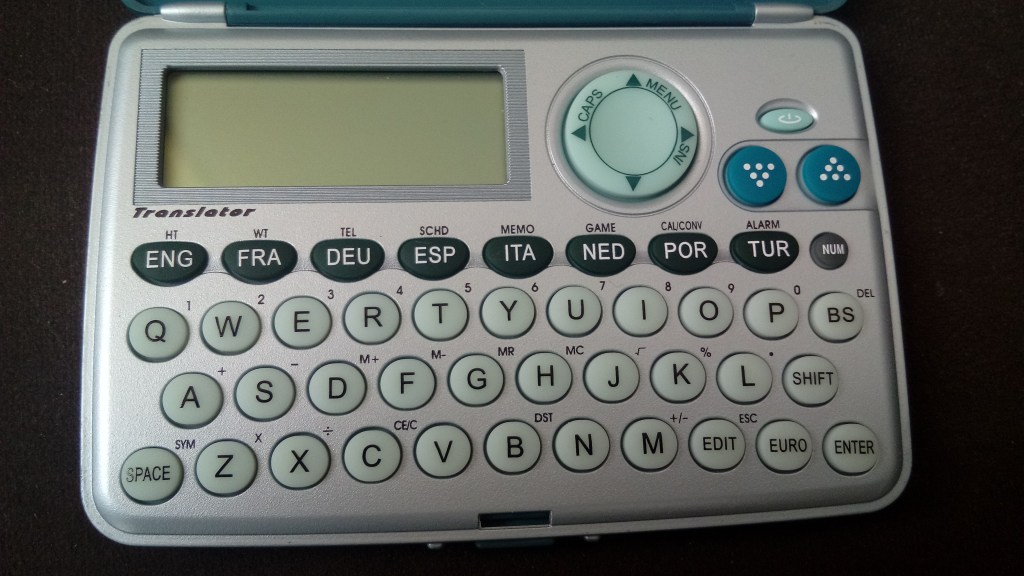
Pocketalk’s current devices combine two-way voice translation, camera translation and built-in connectivity options. Vasco’s Translator V4 combines voice, text and photo translation in a handheld format and promotes built-in connectivity for use across many countries. Timekettle’s Fluentalk T1 follows the same dedicated-hardware idea with voice translation, photo translation, mobile data and offline language support.
The reason this format remains interesting is focus.
A hotel desk can keep one translator available for guests. A field team can share one device. A traveler can keep translation separate from the rest of the phone. A business can place the device where multilingual conversations happen repeatedly.
The hardware has one job, so the interaction can stay close to that job.
Choose the language. Speak. Read or hear the result. Continue.
That makes dedicated translation devices a different workflow rather than a smaller version of a smartphone.
Built-In Connectivity Makes Translation Ready to Travel
Translation becomes more useful when connectivity is part of the product design.
Dedicated translator makers have made this a major part of their hardware.
Pocketalk says its S2 devices include a multi-year cellular data plan with coverage across more than 170 countries and regions. Vasco markets built-in connectivity for translation across nearly 200 countries with its current handheld products. Timekettle’s Fluentalk T1 materials include a period of mobile data service as part of the product experience.
These are manufacturer-provided service terms, so the exact countries, duration and product conditions should be read from the current product page at the time of purchase.
The important idea is what the connectivity is for.
The data path is tied directly to translation.
A traveler can land, turn on the device and use its translation functions through the connectivity included with that product. A shared translator at a reception desk can have its own connection. A field device can remain separate from the user’s personal mobile plan.
Smartphones reach the same goal through another route. Roaming, local SIMs and travel eSIMs can keep translation apps connected while the phone also handles the rest of the user’s travel data.
Both models are useful.
One integrates translation into the user’s main connected device. The other can give translation its own connected device.
Offline Translation Is Becoming Part of Travel Preparation
Offline translation changes the workflow before the trip even begins.
Instead of waiting until connectivity is needed, the user can prepare supported languages in advance.
Google Translate allows supported languages to be downloaded to the phone. Those downloaded language resources can then be used for offline translation, including supported camera translation. Apple also allows supported languages to be downloaded and used through On-Device Mode in Translate.
Dedicated hardware includes offline options as well.
Timekettle publishes offline language support for its Fluentalk devices, allowing selected translation functions to remain available through downloaded language resources. Other dedicated translator makers organize their own language and connectivity support around the specific device and service.
The practical step is simple.
Before traveling, identify the languages you expect to use and prepare the supported offline resources on the device you plan to carry.
That can turn translation into part of the same checklist as maps, tickets and travel documents.
The exact language sets and modes are published by each platform or manufacturer, so the useful comparison is the actual language pair you need.
If the trip is English and Arabic, check English and Arabic. If it is Japanese and Spanish, check that pair.
Translation becomes easier when the preparation matches the conversation that will actually happen.
Camera Translation Turns the Lens Into a Language Tool
Not every translation begins with a person speaking.
Sometimes the problem is a sign.
Or a menu. A label. A ticket machine. A printed instruction. A product package.
Camera translation turns that visual information into another input for the translation system.
Google Translate supports translating text through the camera, making the phone useful when the user needs to understand printed text without typing it manually. Dedicated devices such as Pocketalk, Vasco and Timekettle also include photo or camera translation in their current product lines.
The workflow is direct.
Point the camera. Capture or view the text. Let the device identify the words. Read the translated result.
That matters because travel contains a large amount of written language outside normal conversation.
A traveler can use voice translation with a person, then use the same device for a menu a few minutes later. A reception worker can move between a spoken question and a printed document. A field worker can use translation for labels or instructions without changing the basic device workflow.
The camera expands translation from what people say to what the environment says.
Interpreter Earbuds Are Creating a Third Translation Format
Translation is also moving into the ear.
That creates a third workflow between a smartphone screen and a handheld translator.
Google has expanded live translation through connected headphones, allowing supported phones and headphones to become part of a spoken translation experience. The phone handles the translation system while the audio reaches the user through hardware they may already wear.
Timekettle approaches the same human problem with dedicated interpreter earbuds. Its W4 Pro is designed around multilingual conversation and works with the Timekettle smartphone app as part of the system.
This format changes the physical shape of the interaction.
Instead of both people looking down at one display after every sentence, translated audio can move closer to the way a normal conversation already feels.
The phone can remain the computing and connectivity center. The earbuds become the audio interface.
For longer conversations, meetings, travel discussions and repeated multilingual interaction, that can create a more continuous rhythm.
The category is useful because it shows that translation hardware does not have to mean one more handheld screen.
It can also mean moving the translation interface into something people already understand: listening.
A Separate Translation Device Can Become a Shared Tool
Personal travel is only one use case.
Translation also happens in places where the device belongs to the location rather than one person.
A hotel reception desk can keep a translator available for guests. A training center can use one during multilingual sessions. A tour operator can carry a dedicated device for repeated conversations. A field team can share one translator across several users.
This is where dedicated hardware creates another kind of value.
The device can be treated like work equipment.
It can stay charged at the workstation. Staff can learn one interface. The same languages can be prepared in advance. The device can be handed to another person without opening the owner’s messages, photos, accounts or other personal phone content.
A smartphone remains highly useful for individual translation because it combines language tools with the rest of the user’s digital life.
A dedicated translator can be useful when the translation tool itself needs to be shared.
The difference is not about which device is more advanced.
It is about who owns the workflow.
For personal travel, the translator can live inside the phone. For repeated shared use, the translator can become its own piece of equipment.
The Best Translation Setup Starts With the Conversation
The easiest way to understand this market is to start with what the conversation looks like.
If translation is one part of a larger travel day, smartphone apps fit naturally beside maps, messages, photos, tickets and search.
If translation happens repeatedly as its own task, a dedicated handheld can keep the entire interface centered on languages, voice and camera use.
If the conversation is long and audio-first, interpreter earbuds create another option by moving translated speech closer to normal listening.
Then look at the details that matter to that specific workflow.
Which language pair do you need? Do you want voice, text, camera or all three? Will you prepare offline languages? Do you want the device to have its own connectivity? Will one person use it or will it be shared? Do you want translation on a screen or through headphones?
Those questions reveal why the category keeps expanding.
Google, Apple and Samsung are making the smartphone a stronger multilingual tool. Pocketalk, Vasco and Timekettle are giving translation its own hardware forms. Interpreter earbuds are adding another interface around spoken language.
They are not all trying to become the same product.
They are making translation available in more places, through more devices and with fewer steps between hearing something and understanding it.
That is the upgrade.