
Figma AI + Figma Make

Overview
Figma AI + Figma Make combine Figma's AI-assisted design tools, the Figma agent in Design, and an AI-driven prompt-to-app environment for moving from design exploration to functional prototypes, web apps, interactive UI, and code-backed implementation. Figma AI can generate and remix designs, rewrite and translate copy, create and edit images, search design assets, rename layers, add prototype interactions, create generative plugins and shaders, and work with reusable skills, web search, and MCP connectors. Figma Make adds conversational app generation, Figma design context, attachments, selectable AI models, code-backed visual editing, Make kits, Supabase backends, publishing and custom domains, plus a closed beta for editing a team's real codebase and opening pull requests.
Key Capabilities
20 verified capabilities
Figma agent in Design can generate and remix designs, edit existing work, apply design-system context, give feedback, and automate design tasks
AvailableReusable AI skills package team workflows, conventions, and instructions for repeatable agent use
AvailableMCP connectors let the Figma agent pull context from external tools and write back to supported external sources
AvailableFigma agent web search and URL fetching can ground design work in current external information
AvailableGenerative plugins and shaders can be created from natural-language prompts without hand-writing plugin code
AvailableAgent-driven motion and animation generation for editable interactions, hover states, gradients, timing, and easing
AvailableAI text workflows for generating/replacing realistic content plus rewrite, shorten, tone adjustment, and translation
AvailableAI image workflows for generation, editing, background removal, expansion, isolation/erasure, and resolution enhancement
AvailableAI search and organization tools for finding assets/designs and contextually renaming layers
AvailableAI-assisted prototype interactions can connect frames, navigation, back/next controls, and basic flows
AvailableFigma Make turns prompts, existing Figma designs, and design context into functional prototypes, web apps, and interactive UI
AvailableMake attachments can include Figma designs, images, video, audio, text files, PDFs, and other reference context
AvailableFigma Make model selector currently includes a default model plus Gemini 3.6 Flash, Gemini 3.1 Pro, Claude Sonnet 4.6, Claude Opus, and GPT-5.6
AvailableCode-backed visual editing combines AI chat, direct code view, point-and-edit controls, properties panel, and in-context annotations
AvailablePlan Mode, templates, comments, annotations, version history, custom fonts, and voice-to-text prompting support iterative Make workflows
AvailableMake kits can sync npm packages, library styles, design systems, and usage guidelines into Figma Make
AvailableSupabase backend integration supports data, authentication, secrets, API keys, and external-server requests in Make apps
AvailableFigma Make can publish functional prototypes and web apps to a public figma.site URL and supported custom domains
AvailableMobile apps can preview and interact with Figma Make files, share them, and view/reply to comments; mobile creation/editing is not currently supported
AvailableMake in your local codebase closed beta can open or clone Git repositories, edit a running app, create local commits and branches, and open GitHub pull requests from the Mac beta app
AvailableSpecifications
Structured fields adapt to this product type.
Access & Platforms
- Web access
- Yes
Models & Context
- Primary models
- Figma Make currently offers a default model plus Gemini 3.6 Flash, Gemini 3.1 Pro, Claude Sonnet 4.6, Claude Opus, and GPT-5.6. Figma states that the default model may change over time.
Modalities
- Text input
- Yes
- Image input
- Yes
- Image generation
- Yes
Files & Tools
- File uploads
- Yes
Privacy & Data Controls
- Model training control
- Figma admins can control whether team content contributes to AI training separately from AI feature access. Content training is on by default for Starter and Professional teams but can be turned off; it is off by default for Organization and Enterprise and is currently not available to enable there. Figma states that third-party model providers are not permitted to train their own models on customer content supplied through Figma.
Pricing Details
Figma plan-and-seat subscription with included monthly AI credits; additional AI credits can be purchased on paid plans through subscriptions and/or pay-as-you-go billing
Starter
- Price
- Free
- Billing / AI Credits
- Limited product access; 500 AI credits/month with a 150-credit daily limit.
Professional — Full
- Price
- $16/month
- Billing / AI Credits
- Full access to Figma products including Make; 3,000 AI credits/month. Professional supports monthly or annual billing.
Professional — Dev
- Price
- $12/month
- Billing / AI Credits
- Dev seat; 500 AI credits/month.
Professional — Collab
- Price
- $3/month
- Billing / AI Credits
- Collab seat; 500 AI credits/month.
Organization — Full
- Price
- $55/month
- Billing / AI Credits
- Billed annually; 3,500 AI credits/month.
Organization — Dev
- Price
- $25/month
- Billing / AI Credits
- Billed annually; 500 AI credits/month.
Organization — Collab
- Price
- $5/month
- Billing / AI Credits
- Billed annually; 500 AI credits/month.
Enterprise — Full
- Price
- $90/month
- Billing / AI Credits
- Billed annually; 4,250 AI credits/month.
Enterprise — Dev
- Price
- $35/month
- Billing / AI Credits
- Billed annually; 500 AI credits/month.
Enterprise — Collab
- Price
- $5/month
- Billing / AI Credits
- Billed annually; 500 AI credits/month.
Compatibility & Workflow
Integrations & Limits
- Integrations
- Figma agent MCP connectors; Figma MCP server; Make kits and npm packages; Supabase backend integration; Figma design context and Community content; GitHub integration in the Make-in-your-codebase closed beta; external secrets/API keys inside supported Make backends
- Usage limits
- Seat AI credits reset monthly, do not roll over, and cannot be transferred. Full seats receive 500 credits/month on Starter, 3,000 on Professional, 3,500 on Organization, and 4,250 on Enterprise. Dev, Collab, View, and Starter users receive 500 credits/month; Starter and View also have a 150-credit daily limit. Figma Make consumption varies by model, task complexity, and context. Paid plans can purchase additional credits by subscription and/or pay-as-you-go.
Build & Ship Workflow
| Stage | Current Figma AI / Make Capability |
|---|---|
| Explore | Use the Figma agent to generate design directions, search information, remix work, create diagrams and automate design tasks. |
| Plan | Use Plan Mode in Make to clarify intent and produce an editable implementation plan before generation starts. |
| Generate | Create a functional prototype or web app from a prompt, Figma design, Community content, images and other attached context. |
| Ground in system | Use Make kits, npm packages, library styles and design-system guidelines to improve fidelity to an existing product. |
| Refine | Edit visually with properties, point-and-edit and annotations, or move into code and chat for deeper changes. |
| Add data | Connect Supabase for backend data/auth and manage secrets or external API keys. |
| Review | Use comments, full-screen/mobile previews and version history; copy Make work back to the Figma canvas for design refinement. |
| Publish | Publish to a public figma.site URL, update/unpublish later, and use supported custom domains. |
| Ship to codebase | Closed beta: connect a real Git repository on Mac, make local commits/branches and open GitHub pull requests from Make. |
Related In-Short
Latest 2
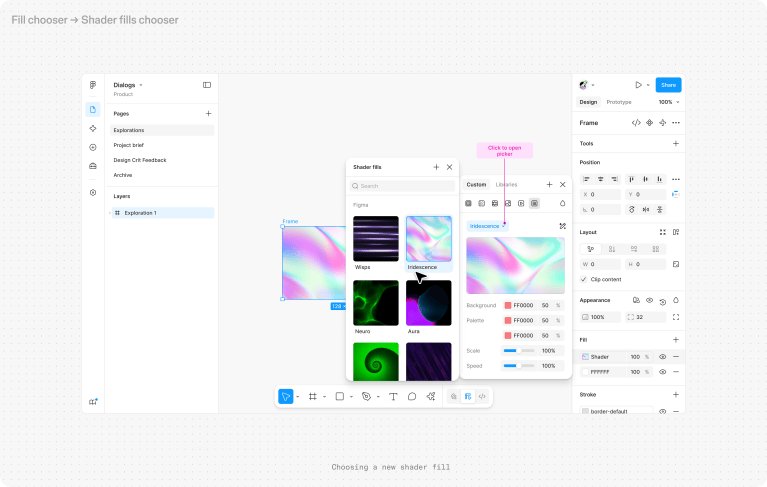
Figma Generative Plugins and Shaders Can Now Be Shared, Animated and Edited as Code
Figma has expanded its generative plugins and shaders with interactive motion, Community and organization publishing, code access, and deeper MCP support.
Read In-Short
Figma Is Turning Agent Prompts Into Reusable Team Skills
Figma now lets users discover, create and publish reusable agent skills, turning repeatable design workflows into something teams can invoke and share instead of recreating prompts from scratch.
Read In-Short